Just got the invitation to the first AZORA (Arizona Oracle user group) meeting on October 23. Here is the link: url
It’s 2 pm at Oracle’s office, 2355 E Camelback Rd Ste 950, Phoenix, AZ.
I’m looking forward to it!
– Bobby
Just got the invitation to the first AZORA (Arizona Oracle user group) meeting on October 23. Here is the link: url
It’s 2 pm at Oracle’s office, 2355 E Camelback Rd Ste 950, Phoenix, AZ.
I’m looking forward to it!
– Bobby
I have an example of paging in some Exadata OS Watcher log files. We got an error in the alert log about a high load but reviewing AWR reports it did not seem like we had an unusual number of active sessions. Also, the CPU use seemed low but the system load was high. Reviewing the OS Watcher logs and finding a similar case on Oracle’s support site convinced me that our issue was due to a large amount memory being paged out to the swap file.
Here is the top report from the problematic time:
top - 11:07:58 up 239 days, 14:57, 0 users, load average: 204.84, 183.48, 106.74 Tasks: 1097 total, 71 running, 1022 sleeping, 0 stopped, 4 zombie Cpu(s): 1.3%us, 98.0%sy, 0.0%ni, 0.2%id, 0.5%wa, 0.0%hi, 0.1%si, 0.0%st Mem: 74026796k total, 72456380k used, 1570416k free, 2436k buffers Swap: 16771852k total, 7884656k used, 8887196k free, 597336k cached PID USER PR NI VIRT RES SHR S %CPU %MEM TIME+ COMMAND 894 oracle 15 0 324m 26m 10m S 309.1 0.0 129:46.34 /u01/app/11.2.0.2/grid/bin/diskmon.bin -d -f 1053 root 20 -5 0 0 0 R 100.0 0.0 32:10.62 [kswapd0] 3366 oracle 16 0 1440m 54m 18m S 146.6 0.1 3:03.54 /u01/app/11.2.0.2/grid/bin/oraagent.bin 23809 oracle 18 0 992m 179m 16m S 128.1 0.2 158:45.67 /u01/app/oracle/Middleware/agent11g/bin/emagent 28878 orarom 18 0 982m 360m 11m S 101.5 0.5 94:58.36 /opt/OracleHomes/agent_home/core/12.1.0.3.0/jdk/bin/java -Xmx154M -XX:MaxPermSize=96M -se 4501 oracle 19 0 4423m 96m 24m R 89.6 0.1 2435:54 ora_dia0_ourprdfs1 18318 oracle 20 0 26.3g 610m 70m R 86.3 0.8 2025:17 ora_p001_ourprd1 18226 oracle 18 0 26.3g 595m 61m D 82.3 0.8 212:20.62 ora_p013_ourprd1 7619 oracle 19 0 1727m 16m 14m R 80.5 0.0 0:50.29 oracle+ASM1 (LOCAL=NO) 4389 oracle 25 0 25.9g 158m 27m R 78.5 0.2 2557:06 ora_dia0_ourprd1 11008 oracle 18 0 26.3g 561m 133m D 77.9 0.8 373:34.37 ora_p010_ourprd1 8484 root 25 0 238m 6276 2600 R 77.3 0.0 0:46.60 python /usr/local/bin/dcli -s -q -l root -g cell_group exec 2>&1; cellcli -e list quaranti 7937 oracle 18 0 26.3g 603m 86m R 76.5 0.8 1656:21 ora_p021_ourprd1 24118 oracle 25 0 26.3g 602m 103m R 72.7 0.8 2997:08 ora_p007_ourprd1 4491 oracle 16 0 5912m 121m 25m D 72.6 0.2 2407:59 ora_dia0_obrprd1 7919 oracle 25 0 26.4g 680m 247m R 72.2 0.9 4256:57 ora_p011_ourprd1 4384 oracle 18 0 4407m 95m 25m D 70.8 0.1 2344:36 ora_dia0_otrprd1 4397 oracle 23 0 25.8g 44m 23m D 69.5 0.1 1695:21 ora_lmd0_ourprd1 2548 oracle 20 0 1809m 116m 44m R 69.3 0.2 2393:41 asm_dia0_+ASM1
Note the load of 204 and the system cpu % of 98%. By 11:07 CPU utilization had gone back up so I assume that the swapping I/O had completed but then a bunch of system I/O kicked off. Also I assume that [kswapd0] has something to do with swapping. Here is the mpstat report:
CPU %user %nice %sys %iowait %irq %soft %steal %idle intr/s 10:59:00 all 3.49 0.00 2.05 93.81 0.01 0.16 0.00 0.48 4144.00 10:59:05 all 4.94 0.00 2.45 92.21 0.01 0.11 0.00 0.28 2548.00 10:59:16 all 1.42 0.00 1.82 95.64 0.02 0.13 0.00 0.97 3108.66 10:59:21 all 3.84 0.00 3.58 90.68 0.04 0.49 0.00 1.38 3868.40 10:59:26 all 1.99 0.00 1.85 93.56 0.01 0.13 0.00 2.46 2942.48 10:59:31 all 1.38 0.00 1.85 91.37 0.01 0.10 0.00 5.29 2479.04 10:59:36 all 1.75 0.00 2.81 94.19 0.01 0.16 0.00 1.08 2762.60 10:59:41 all 0.89 0.00 1.09 97.41 0.00 0.05 0.00 0.56 2116.80 10:59:46 all 1.19 0.00 1.21 93.91 0.03 0.11 0.00 3.55 2992.40 10:59:51 all 1.79 0.00 1.75 95.88 0.01 0.28 0.00 0.29 3820.00 10:59:56 all 2.09 0.00 1.55 92.85 0.03 0.21 0.00 3.28 4410.80 11:00:01 all 1.85 0.00 1.91 96.00 0.01 0.11 0.00 0.11 3433.47 11:00:06 all 1.50 0.00 1.45 89.07 0.01 0.11 0.00 7.85 3746.00 11:00:11 all 6.41 0.00 10.68 80.29 0.09 0.80 0.00 1.73 9269.46 11:00:16 all 17.14 0.00 19.42 57.12 0.14 0.83 0.00 5.35 17018.64 11:00:21 all 8.58 0.00 80.85 9.01 0.05 0.23 0.00 1.29 6951.70 11:00:27 all 6.21 0.00 91.77 1.12 0.04 0.09 0.00 0.78 5417.11 11:00:32 all 5.65 0.00 93.75 0.53 0.01 0.04 0.00 0.02 3289.82 11:00:38 all 2.72 0.00 96.81 0.35 0.01 0.02 0.00 0.09 2480.87 11:00:44 all 1.73 0.00 97.89 0.28 0.00 0.02 0.00 0.08 1745.89 11:01:00 all 1.85 0.00 97.72 0.16 0.01 0.04 0.00 0.22 2710.93 11:01:05 all 0.79 0.00 98.84 0.25 0.00 0.04 0.00 0.09 2543.39 11:02:23 all 1.00 0.00 98.72 0.15 0.00 0.02 0.00 0.10 1558.00 11:02:33 all 0.95 0.00 98.74 0.09 0.00 0.09 0.00 0.13 1488.49 11:02:39 all 1.64 0.00 98.13 0.08 0.01 0.05 0.00 0.08 1441.73 11:02:44 all 0.46 0.00 99.29 0.10 0.00 0.09 0.00 0.06 1465.73 11:03:20 all 1.54 0.00 97.96 0.25 0.01 0.07 0.00 0.17 2757.95 11:03:25 all 0.40 0.00 99.24 0.21 0.00 0.02 0.00 0.12 1550.60 11:03:30 all 0.39 0.00 99.22 0.23 0.00 0.01 0.00 0.15 1421.20 11:03:35 all 3.29 0.00 96.32 0.25 0.01 0.03 0.00 0.10 1952.51 11:03:40 all 5.90 0.00 93.76 0.28 0.00 0.01 0.00 0.05 1407.00 11:03:45 all 1.14 0.00 98.56 0.20 0.00 0.01 0.00 0.09 1418.00 11:03:50 all 0.19 0.00 99.55 0.21 0.00 0.03 0.00 0.03 1356.69 11:04:23 all 0.36 0.00 99.31 0.18 0.00 0.04 0.00 0.10 1621.67 11:06:13 all 0.58 0.00 99.13 0.14 0.00 0.04 0.00 0.11 1550.73 11:06:18 all 3.32 0.00 96.36 0.23 0.00 0.04 0.00 0.06 2055.30 11:06:24 all 4.39 0.00 95.32 0.24 0.00 0.02 0.00 0.03 1991.53 11:06:31 all 4.14 0.00 95.48 0.28 0.01 0.02 0.00 0.07 1598.53 11:07:21 all 1.38 0.00 98.32 0.19 0.00 0.01 0.00 0.09 1444.49
Notice how it is almost all IO until around 11 am and then it switches to all system cpu%. I assume the I/O was swapping memory out. The meminfo report has these numbers:
zzz ***Mon Sep 1 11:00:11 CDT 2014 MemTotal: 74026796 kB MemFree: 330888 kB ... SwapTotal: 16771852 kB SwapFree: 8153352 kB
I take this to mean that we have about 330 meg free out of 74 gig total, but still 8 gig of swap. Presumably when free memory gets low then idle processes get swapped out. A member of our Unix team pointed out the swapping on the vmstat output. Here is a section that shows a lot of pages getting swapped out (so). Each line represents 5 seconds and I think it starts 10:57:56.
zzz ***Mon Sep 1 10:05:31 CDT 2014 Sample interval 5 seconds -- deleted 629 lines = 629*5 seconds = 3145 seconds -- 10:57:56 am procs -----------memory---------- ---swap-- -----io---- --system-- -----cpu------ r b swpd free buff cache si so bi bo in cs us sy id wa st 86 16 7567956 328800 800 610940 56 5350 157 5381 1626 10013 4 96 0 0 0 44 32 7602804 327956 996 613940 222 10464 554 10510 2177 13818 0 99 0 0 0 1 109 7632732 330412 2284 619780 290 7986 1738 8130 3382 14002 1 21 7 70 0 35 41 7702076 353744 2504 621392 623 16054 1290 16206 8776 19234 2 3 2 92 0 1 103 7749296 327480 2692 622004 422 11307 789 11574 3839 16138 3 2 1 94 0 4 109 7849812 330972 3036 624808 1974 24691 2844 25110 11705 36080 4 3 1 92 0 0 66 7869628 346228 3108 626444 859 6309 1055 6309 5538 16922 3 1 1 94 0 23 104 7895176 1998796 3300 624864 1032 7582 1283 7784 4032 24443 56 3 1 40 0 3 90 7918016 328212 4144 632880 4910 5939 6866 6406 13908 47820 40 8 3 49 0 1 101 7983136 333008 4480 627416 1180 15655 1523 15960 3977 16945 5 3 1 91 0 1 125 8033148 327376 4712 628312 922 12213 1302 12295 3545 16946 4 3 0 93 0 1 141 8072048 329060 4856 626976 764 10862 986 11082 3684 21305 2 1 1 96 0 2 76 8106056 327556 5056 627124 797 8855 1048 8946 3968 15044 2 2 0 96 0 0 103 8181216 328348 5284 611140 2415 16583 3076 16938 4374 17445 4 5 2 90 0 4 92 8222500 330044 5408 610708 1470 9698 1874 9898 2842 15110 2 2 2 94 0 4 94 8285204 328932 5936 614128 1015 14754 1678 15213 3324 18240 2 2 5 91 0 1 111 8326908 327348 6184 614600 1034 9759 1465 10012 2577 14809 2 2 1 95 0 1 119 8338520 328352 6332 616076 610 4896 834 4952 2505 15373 1 1 1 97 0 0 98 8378304 329308 6536 615944 975 9795 1334 9931 3802 15897 2 2 3 93 0 0 89 8404456 327204 6800 618872 1232 8327 1662 8413 4557 16856 2 2 2 94 0 0 123 8430092 327272 7092 619016 1004 7379 1393 7672 2852 14689 1 1 2 96 0 1 92 8453420 327212 7284 622700 1738 7250 2259 7494 4241 17781 2 2 2 94 0 7 76 8562308 329132 7860 628932 2616 23847 3409 25162 6833 20938 4 7 7 82 0 5 60 8691628 334124 7012 635948 6066 28059 8119 32201 13584 32154 15 23 1 61 0 63 37 8683600 327404 2812 582200 8138 661 12947 2870 12507 26754 12 44 6 38 0 98 22 8696516 328056 1260 560572 10494 7070 15550 9394 28854 128944 3 96 0 0 0 72 14 8694008 327148 1960 557616 1693 3 3222 161 5014 29030 5 95 0 0 0 125 19 8693816 327172 1020 558488 226 1 569 227 1991 13841 0 99 0 0 0 97 15 8703600 327044 1032 554792 5083 3217 10447 3722 26436 202860 1 99 0 0 0 102 20 8733556 327272 1432 556224 2573 6713 5399 7194 16118 66262 1 98 0 0 0 84 9 8732984 327164 1100 555640 470 2 1090 117 1585 11922 0 99 0 0 0 85 13 8732940 327304 880 554024 60 0 317 50 1470 11247 0 99 0 0 0 149 24 8732808 327428 988 553988 133 0 814 334 1962 12802 4 95 0 0 0 153 22 8732640 327284 592 553576 187 0 875 548 4619 36573 2 98 0 0 0 159 15 8732584 327104 604 552956 50 0 96 118 2294 11239 0 99 0 0 0 142 14 8732432 328644 1524 554196 174 0 1706 260 6035 45843 0 99 0 0 0 158 12 8755436 327460 2704 555568 1130 4927 2564 5486 14539 103001 0 99 0 0 0 125 14 8754920 327980 748 554368 406 0 662 6 1583 10952 0 100 0 0 0 115 16 8752204 327472 1724 553740 2453 5 6014 532 11366 82957 1 99 0 0 0 124 19 8752276 327076 1092 554200 78 28 113 81 1767 11712 1 99 0 0 0 82 8 8757568 346356 2384 556132 1316 3202 4373 3837 6633 42986 1 99 0 0 0 151 57 8756348 329524 3632 559164 828 0 3718 429 2076 11613 3 96 0 0 0 159 49 8755120 328488 3248 557720 1033 9 4298 212 2248 12981 4 95 0 0 0 107 36 8771748 332068 1016 557272 2765 3977 9481 4370 14773 103588 2 98 0 0 0 117 16 8771592 327180 1168 558788 156 0 979 58 1466 9988 1 99 0 0 0 3 101 7875688 1448712 5300 599300 29898 73754 52723 83528 62497 360936 2 94 0 4 0 3 96 7874004 1260800 8856 624552 7470 0 14911 569 3814 17649 5 1 33 61 0 1 92 7859256 558968 11228 649948 5590 0 11118 2798 10027 41964 20 5 12 63 0 0 96 7915604 327600 14060 652636 4674 11822 7818 12173 9053 22067 8 7 20 65 0 8 98 7963060 327240 11800 635164 1994 11097 3294 12031 6762 16549 3 7 1 90 0 1 104 7969976 340320 8812 579564 9600 1558 12002 2998 8588 22984 17 34 10 39 0 4 89 7642788 666372 10244 603740 7154 0 12148 2375 9681 23420 7 5 22 67 0 1 94 7642548 327912 12556 625672 7011 3 12173 1704 7865 21465 6 5 18 71 0 7 95 7630564 327572 3396 557488 5970 33 10358 1827 4756 15284 5 67 3 25 0 113 45 7630124 330244 1900 545524 3819 5 7540 1314 3781 13454 2 88 0 10 0 0 88 6897380 1321012 3560 573532 3635 1 9076 2802 3414 11193 3 64 7 26 0 1 94 6889436 981560 6188 624532 8463 0 16870 4122 4949 17243 2 1 31 65 0 0 79 6889308 890800 8444 666940 7332 0 13390 3077 3337 15930 5 1 33 60 0 1 74 6878180 797212 10720 715612 6776 0 14430 4653 3424 13069 11 6 37 47 0 0 141 6876812 406704 12856 739628 7202 0 11406 2342 4737 23064 6 5 24 64 0 2 66 6874848 336480 13428 656312 6296 1 10126 1848 4375 16755 7 9 32 52 0 2 69 6874192 338016 8288 577196 7297 0 14230 1208 5771 16410 10 5 38 47 0 1 72 6873696 342908 3796 576568 6161 1 12562 1149 5506 13421 11 5 34 50 0 2 78 6873524 336716 3992 589684 5718 0 12693 280 5268 11889 9 2 31 58 0 97 48 6873180 331280 2884 559732 5110 4 7616 934 6994 14502 7 38 12 43 0 120 41 6872636 327192 1504 549972 4309 32 7965 1497 7029 14159 5 92 0 3 0 101 26 6870204 327620 1992 548548 4122 19 8110 1191 9559 20993 4 96 0 0 0 82 16 6886048 327184 984 547140 2050 3186 3662 3385 4978 16982 2 98 0 0 0 83 6 6886384 327096 1376 545516 563 69 1284 184 1946 7812 1 99 0 0 0 93 11 6886364 328100 836 545120 798 0 911 18 5495 23655 0 100 0 0 0 27 42 7008372 328376 3216 550820 7050 26176 9220 26390 9919 42056 0 100 0 0 0 3 112 7044188 328628 4552 554876 2424 8493 3526 8570 2402 7432 2 78 1 19 0 3 113 7108916 348172 5532 560420 3186 14382 4325 14512 9715 15529 4 6 4 87 0 0 125 7136504 366528 7040 567140 4077 10618 5413 10906 15231 26777 4 1 12 83 0 1 111 7149172 387580 7320 568044 391 4344 719 4394 2460 7519 1 1 0 99 0 1 94 7178000 328136 9984 580152 5768 7927 8617 8990 20026 30064 8 3 9 80 0 0 86 7204696 327100 10268 583912 1972 6991 2825 7515 5943 12124 3 2 8 87 0 0 103 7218656 347300 10564 585360 457 4985 733 5144 1936 8120 0 1 6 93 0 5 98 7236196 345460 10784 585224 1298 5318 1467 5477 7973 13715 3 2 6 89 0 1 111 7243488 328920 10932 586500 488 3097 839 3136 1843 7555 1 1 6 92 0 0 103 7265100 328016 11132 591452 1439 6088 2170 6241 3984 9707 2 1 2 95 0 2 91 7274576 335116 11272 591240 709 3526 789 3750 2162 7734 3 1 2 95 0 1 124 7303804 329200 11408 593516 1170 7348 1587 7614 4230 9955 3 1 6 90 0 4 61 7403224 343940 11724 601684 3143 20878 4191 22518 7000 14053 4 4 3 89 0 11 62 7589208 349448 12504 607764 4350 38374 5784 38847 13038 21696 6 6 9 79 0 3 56 7777608 338348 13328 614952 6506 38412 7919 38711 11993 18575 6 6 16 71 0 2 49 8025300 331604 13568 618408 5642 50410 6727 50490 14740 19779 7 7 35 51 0 1 69 8159548 977560 14304 624024 4725 27423 6727 28257 13122 22037 10 7 12 72 0 5 50 8159156 869324 18188 647964 9421 0 13542 1034 14117 30070 16 4 24 55 0 2 46 8158644 768600 20324 663440 10323 0 13395 2023 18356 27259 15 3 52 30 0 3 43 8158308 551160 22344 678548 12241 0 16135 623 14080 23349 19 3 42 36 0
We got this message in the alert log:
Mon Sep 01 11:09:28 2014 GES: System Load is HIGH. GES: Current load is 204.89 and high load threshold is 80.00
After this the instance crashed:
Instance terminated by LMS0, pid = 4532
Bug 17316830, “ROOT CAUSE ALL DATABASE INSTANCES CRASHED ON ONE OF OUR NODES”, relates high paging and low free memory to the same GES load messages and to instances crashing as ours did. So, it seems that when you have a lot of paging it can cause an instance to crash. Is this a bug or a feature? 🙂
It was interesting to look at the OS Watcher files to see information about the nature of the system when our issues occurred. Looks like lots of paging. The only question is what caused the paging? We are trying to figure out if we just had some abnormally high memory use from our application or if some bug caused some system processes to eat up the normally free memory. But, I thought I would share the investigation we did using the OS Watcher logs because it was interesting to see an example with paging, even though we have not gotten to the root of the problem.
– Bobby
Yesterday and today I’ve read or heard two people mention the force_match => TRUE parameter value for DBMS_SQLTUNE.IMPORT_SQL_PROFILE and how it forces a profile to work on all SQL statements that are the same except for their literal values. So, I ran a quick test using the coe_xfr_sql_profile.sql utility that comes with the SQLT scripts that are available for download on Oracle’s support site.
I’ve mentioned in earlier posts how we use coe_xfr_sql_profile.sql to force plans on particular SQL statements using the sql_id of the SQL statement and the plan_hash_value of the plan:
Yesterday I read this post by David Kurtz where he mentions force_match: post
Today I heard Karen Morton mention force_match in her webinar which should soon be posted here: url
So, after the webinar completed I built a test case to see how the force_match=>TRUE option works. I created a test table and ran a query with a literal in the where clause and got its plan showing its sql_id and plan_hash_value:
ORCL:SYSTEM>create table test as select * from dba_tables; ORCL:SYSTEM>SELECT sum(blocks) from test 2 where owner='SYS'; SUM(BLOCKS) ----------- 34633 ORCL:SYSTEM>select * from 2 table(dbms_xplan.display_cursor(null,null,'ALL')); PLAN_TABLE_OUTPUT -------------------------------------------------------------------- SQL_ID 10g08ytt2m5mu, child number 0 ------------------------------------- SELECT sum(blocks) from test where owner='SYS' Plan hash value: 1950795681 --------------------------------------------------------------- | Id | Operation | Name | Rows | Bytes | Cost (%CPU)| ---------------------------------------------------------------- | 0 | SELECT STATEMENT | | | | 29 (100)| | 1 | SORT AGGREGATE | | 1 | 30 | | |* 2 | TABLE ACCESS FULL| TEST | 992 | 29760 | 29 (0)| ----------------------------------------------------------------
Then I ran coe_xfr_sql_profile.sql to create a profile that forces the plan on the given sql_id:
SQL> @coe_xfr_sql_profile.sql 10g08ytt2m5mu 1950795681
Then, using vi I edited the output of coe_xfr_sql_profile.sql:
vi coe_xfr_sql_profile_10g08ytt2m5mu_1950795681.sql
I searched for force_match and changed the line to read like this:
force_match => TRUE
instead of
force_match => FALSE
There are comments in the script explaining the meaning of these two values but I don’t want to plagiarize the script by including them here. Next I ran the edited script:
sqlplus system/password < coe_xfr_sql_profile_10g08ytt2m5mu_1950795681.sql
Then I ran a test showing that not only the original query with the where clause literal ‘SYS’ would use the profile but the same query with a different literal ‘SYSTEM’ would use the created profile.
ORCL:SYSTEM>SELECT sum(blocks) from test 2 where owner='SYS'; SUM(BLOCKS) ----------- 34633 ORCL:SYSTEM>select * from 2 table(dbms_xplan.display_cursor(null,null,'ALL')); PLAN_TABLE_OUTPUT -------------------------------------------------------------------- SQL_ID 10g08ytt2m5mu, child number 0 ------------------------------------- SELECT sum(blocks) from test where owner='SYS' Plan hash value: 1950795681 ---------------------------------------------------------------- | Id | Operation | Name | Rows | Bytes | Cost (%CPU)| ---------------------------------------------------------------- | 0 | SELECT STATEMENT | | | | 29 (100)| | 1 | SORT AGGREGATE | | 1 | 30 | | |* 2 | TABLE ACCESS FULL| TEST | 81 | 2430 | 29 (0)| ---------------------------------------------------------------- Note ----- - SQL profile coe_10g08ytt2m5mu_1950795681 used for this statement ORCL:SYSTEM>SELECT sum(blocks) from test 2 where owner='SYSTEM'; SUM(BLOCKS) ----------- 520 ORCL:SYSTEM> ORCL:SYSTEM>select * from 2 table(dbms_xplan.display_cursor(null,null,'ALL')); PLAN_TABLE_OUTPUT -------------------------------------------------------------------- SQL_ID 806ncj0a5fgus, child number 0 ------------------------------------- SELECT sum(blocks) from test where owner='SYSTEM' Plan hash value: 1950795681 ---------------------------------------------------------------- | Id | Operation | Name | Rows | Bytes | Cost (%CPU)| ---------------------------------------------------------------- | 0 | SELECT STATEMENT | | | | 29 (100)| | 1 | SORT AGGREGATE | | 1 | 30 | | |* 2 | TABLE ACCESS FULL| TEST | 81 | 2430 | 29 (0)| ---------------------------------------------------------------- Note ----- - SQL profile coe_10g08ytt2m5mu_1950795681 used for this statement
Note that a different sql_id = 806ncj0a5fgus represents the second statement but the same plan_hash_value = 1950795681. Also note that the SQL profile has the same name in both plans = coe_10g08ytt2m5mu_1950795681.
Now that I’m aware of the force_match=>TRUE option of DBMS_SQLTUNE.IMPORT_SQL_PROFILE I can use SQL profiles to force plans on queries that have different literal values, but are otherwise identical. This adds a whole new set of problems that can be resolved without modifying the existing code which can really help in a performance firefight.
– Bobby
I saw this fun blog post about the Arizona Oracle User Group getting organized: blog post(updated with meetup page).
I’m definitely interested in being involved. Please pass this on to any Oracle DBAs, developers, etc. that you know in the Phoenix area.
– Bobby
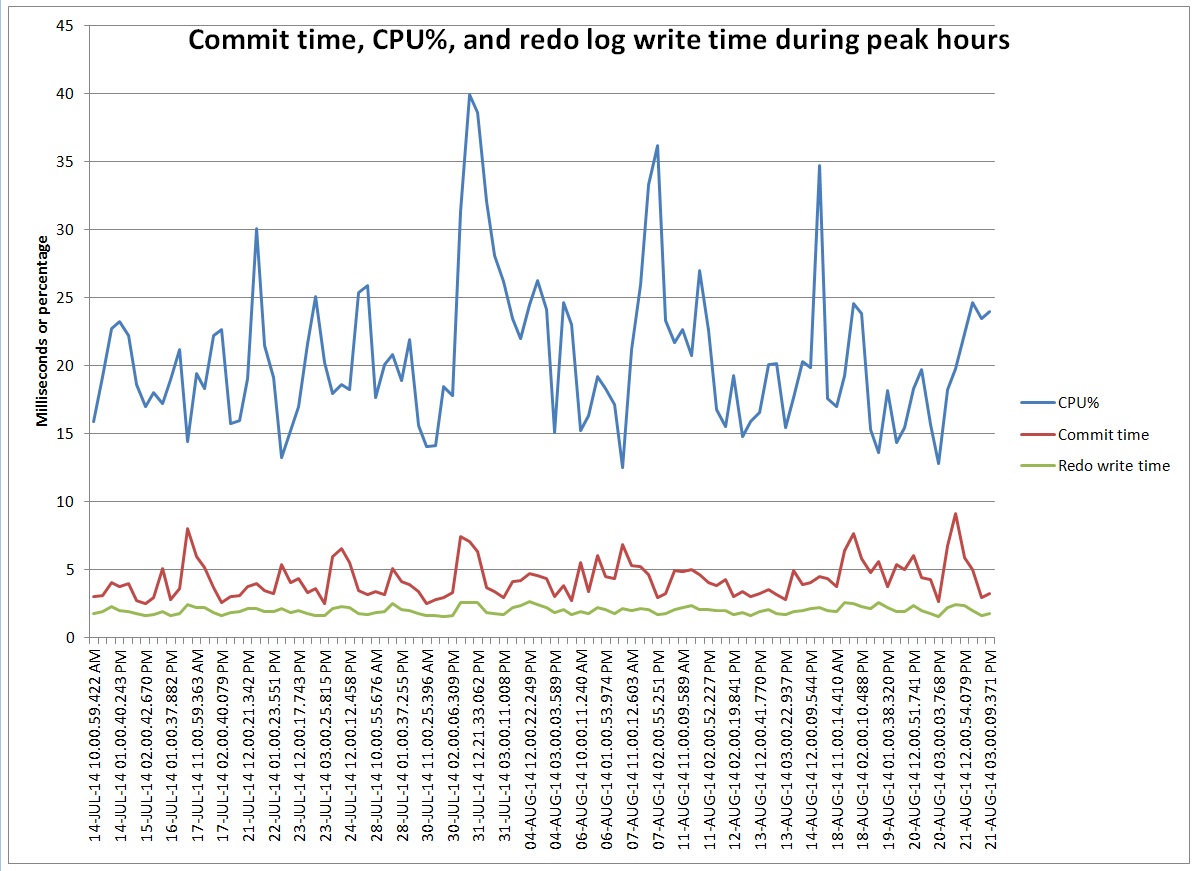
This graph represents commit time compared to CPU utilization and redo log write time. I’ve included only the hourly intervals with more than 1,000,000 commits. At these peaks the number of commits ranges 1 to 1.6 million commits per hour so each point on the graph represents roughly the same commit rate. I’m puzzled by why the commit time bounces around peaking above 5 milliseconds when I can’t see any peaks in I/O or CPU that correspond to the commit time peaks.
I derived CPU% from DBA_HIST_OSSTAT. I got the other values by getting wait events from DBA_HIST_SYSTEM_EVENT. Commit time is log file sync wait time. Redo write time is log file parallel write wait time. I converted the wait times to milliseconds so they fit nicely on the chart with CPU%.
I thought I would pass this along as a puzzle that I haven’t figured out.
Here is a zip of the script I used to get the data, its raw output, and the spreadsheet I used to make the chart: zip
– Bobby
P.S. This is on HP-UX 11.31, Itanium, Oracle 11.2.0.3
P.P.S Did some more work on this today. Looks like the high commit time periods have short spikes of long redo log writes even though the average over the hour is still low. I’m looking at DBA_HIST_SYSTEM_EVENT to get a histogram of the log file parallel write waits and there are a number in the 1024 bucket when the log file sync time is high on average.
END_INTERVAL_TIME LFPW_MILLI LFPW_COUNT AVG_COMMIT_MS AVG_WRITE_MS ------------------- ---------- ---------- ------------- ------------ 21-AUG-14 11.00 AM 1 268136 9.14914833 2.45438987 21-AUG-14 11.00 AM 2 453913 9.14914833 2.45438987 21-AUG-14 11.00 AM 4 168370 9.14914833 2.45438987 21-AUG-14 11.00 AM 8 24436 9.14914833 2.45438987 21-AUG-14 11.00 AM 16 5675 9.14914833 2.45438987 21-AUG-14 11.00 AM 32 6122 9.14914833 2.45438987 21-AUG-14 11.00 AM 64 3369 9.14914833 2.45438987 21-AUG-14 11.00 AM 128 2198 9.14914833 2.45438987 21-AUG-14 11.00 AM 256 1009 9.14914833 2.45438987 21-AUG-14 11.00 AM 512 236 9.14914833 2.45438987 21-AUG-14 11.00 AM 1024 19 9.14914833 2.45438987 21-AUG-14 11.00 AM 2048 0 9.14914833 2.45438987 21-AUG-14 02.00 PM 1 522165 2.97787777 1.64840599 21-AUG-14 02.00 PM 2 462917 2.97787777 1.64840599 21-AUG-14 02.00 PM 4 142612 2.97787777 1.64840599 21-AUG-14 02.00 PM 8 17014 2.97787777 1.64840599 21-AUG-14 02.00 PM 16 4656 2.97787777 1.64840599 21-AUG-14 02.00 PM 32 5241 2.97787777 1.64840599 21-AUG-14 02.00 PM 64 1882 2.97787777 1.64840599 21-AUG-14 02.00 PM 128 820 2.97787777 1.64840599 21-AUG-14 02.00 PM 256 149 2.97787777 1.64840599 21-AUG-14 02.00 PM 512 10 2.97787777 1.64840599 21-AUG-14 02.00 PM 1024 2 2.97787777 1.64840599 21-AUG-14 02.00 PM 2048 0 2.97787777 1.64840599
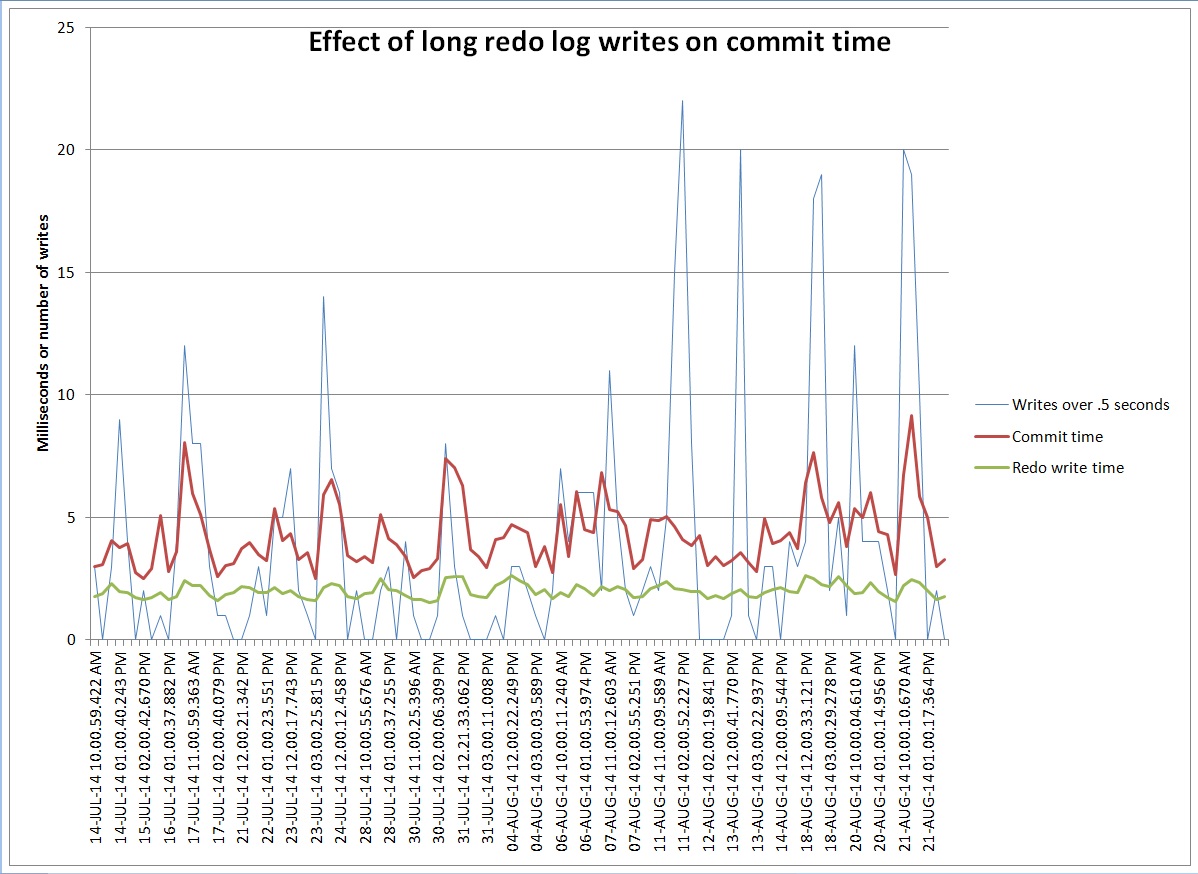
There were 19 waits over half a second in the first hour and only 2 in the second hour. Maybe all the log file sync waits pile up waiting for those long writes. Here is a graph that compares the number of waits over half a second – the 1024 ms bucket – to the average log file sync and log file parallel write times for the hour:
You can see that the average redo write time goes up a little but the commit time goes up more. Maybe commit time is more affected by a few long spikes than by a lot of slightly longer write times.
Found a cool blog post that seems to explain exactly what we are seeing: blog post(DOES NOT EXIST)
I am learning about how well commits scale on Oracle 11.2 and so far they seem to scale surprisingly well.
I’ve looked at two waits – log file parallel write and log file sync. Based on documents I’ve read on Oracle’s support site log file parallel write represents the time it takes to do one write to the redo logs. For mirrored redo logs the log file parallel write time includes the time to write to both of the copies. Log file sync represents the time it takes for a session to complete a commit and should include all the time measured for the write to the redo logs and added CPU time to process the commit. So, the log file sync time should equal or exceed the log file parallel write time.
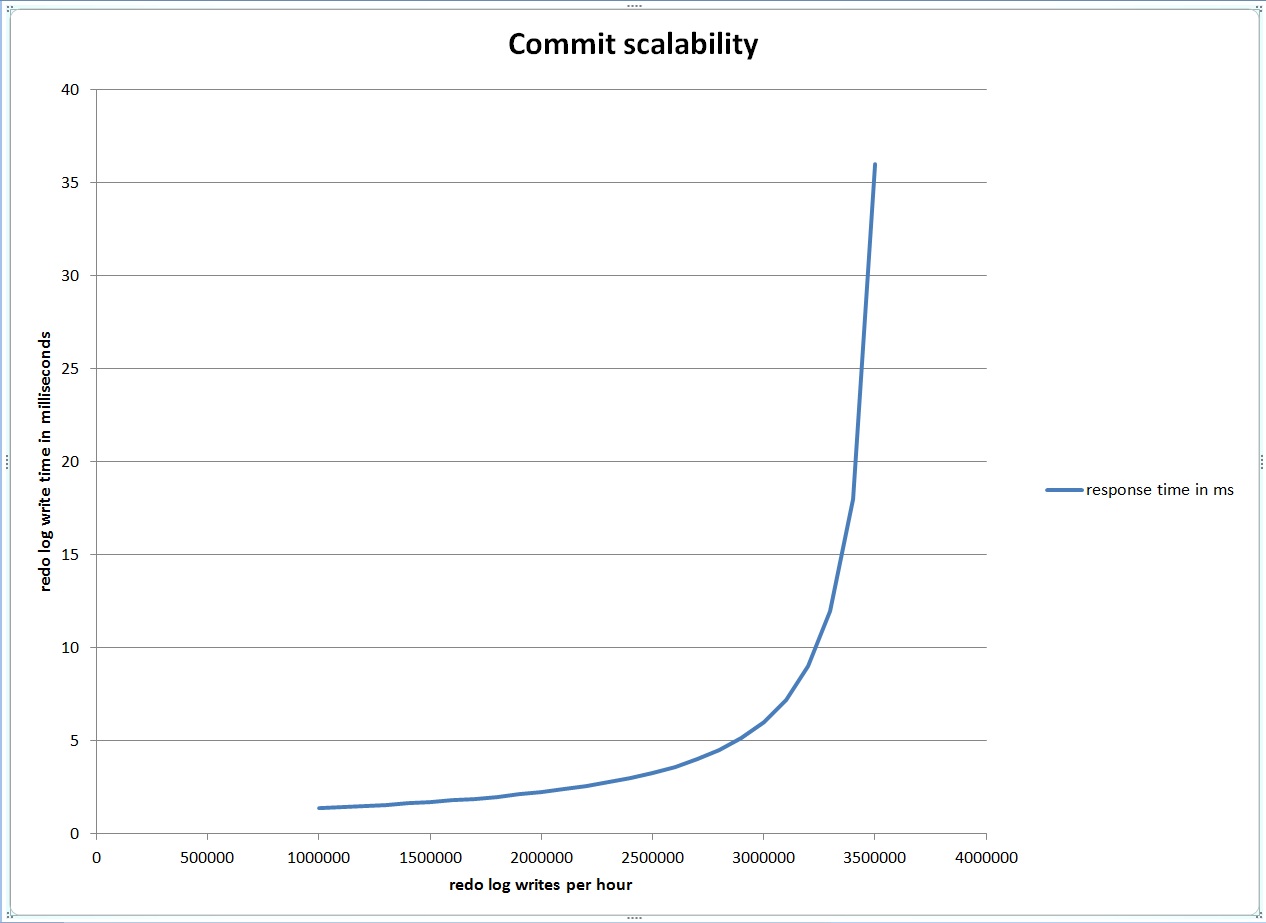
Looking at AWR data I found that at peak times one of our databases had 1 millisecond log file parallel write waits and about 1.2 million waits per hour. Since there are 3.6 million milliseconds in an hour it seemed to me that during this peak hour the redo logs were about 33% utilized because writes to the redo logs were occurring during 1.2 million of the available 3.6 million milliseconds. I decided to look at a simple queuing theory model that I had read about in Craig Shallahamer’s Forecasting Oracle Performance book to get a basic idea of how queuing might impact redo log write time as the utilization of the redo log grew closer to 100%.
This model predicts that the redo log write time will go through the roof as the number of writes per hour approaches 3.6 million, assuming a constant 1 millisecond write time.
To attempt to confirm the predictions made by this graph I decided to build some scripts that will run a bunch of commits on a test database and attempt to max out the writes to the redo log so I could graph the results and compare it to the theoretical model. In the test I had twenty tables named TEST1, TEST2,…, TEST20. These tables have one row and one column. I ran a test of 1, 2, 5, 10, and 20 updating processes that I designed to generate a bunch of commits quickly. Each process ran 100,000 updates and commits like these:
update test1 set a=a+1;
commit;
update test1 set a=a+1;
commit;
update test1 set a=a+1;
commit;
…
Each process had its own table – i.e. process 15 acted on table TEST15.
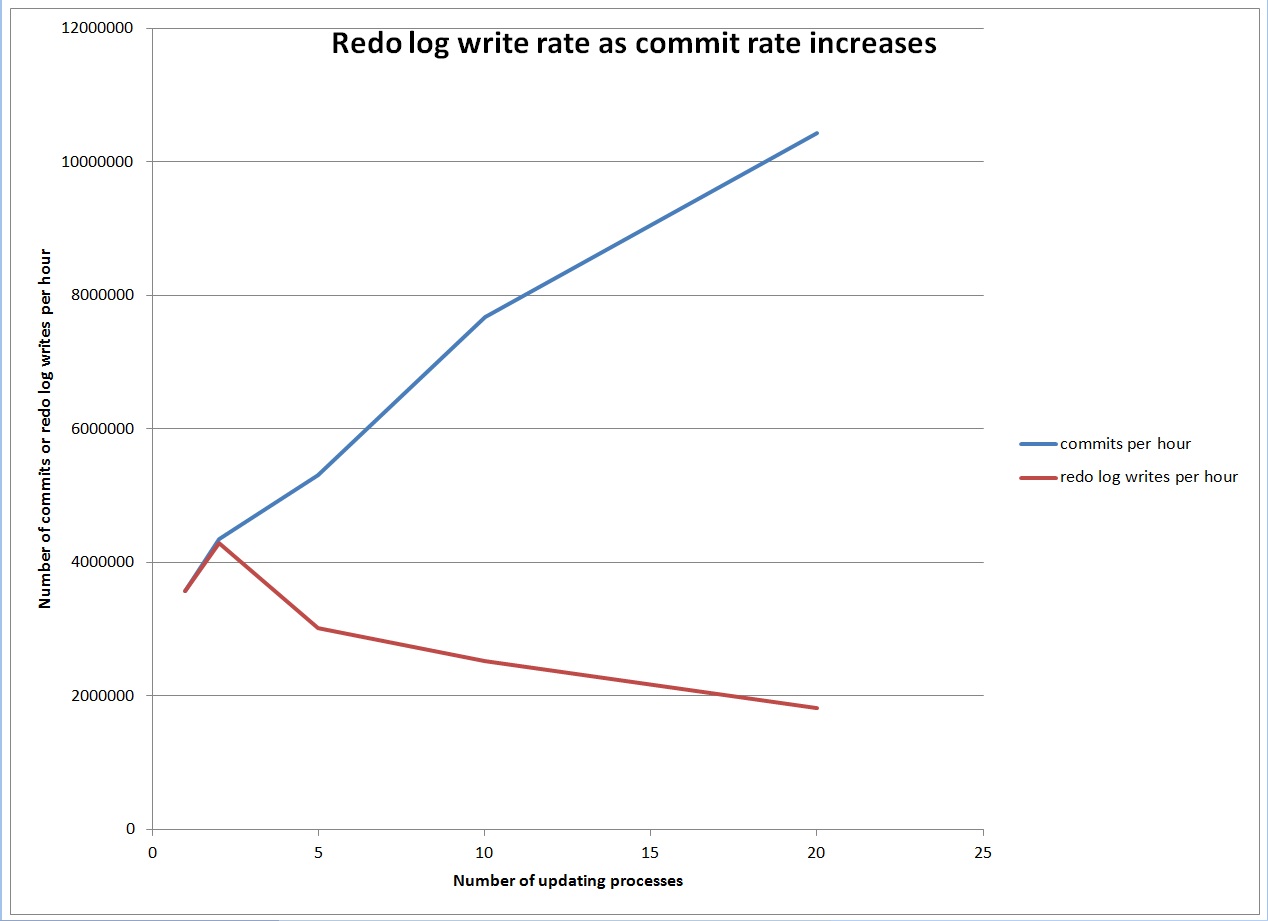
My hope was that as I ran tests with increasing numbers of processes running in parallel eventually I would max out the writes to the redo log and see increasing log file parallel write wait times. But, surprisingly, as the commit rate increased the redo log write rate actually went down.
This is just one test, but it makes me wonder if I can max out the writes to the redo log. I believe that as the commit rate increases the database batches the commits together in some efficient way which makes commits more scalable than I realized.
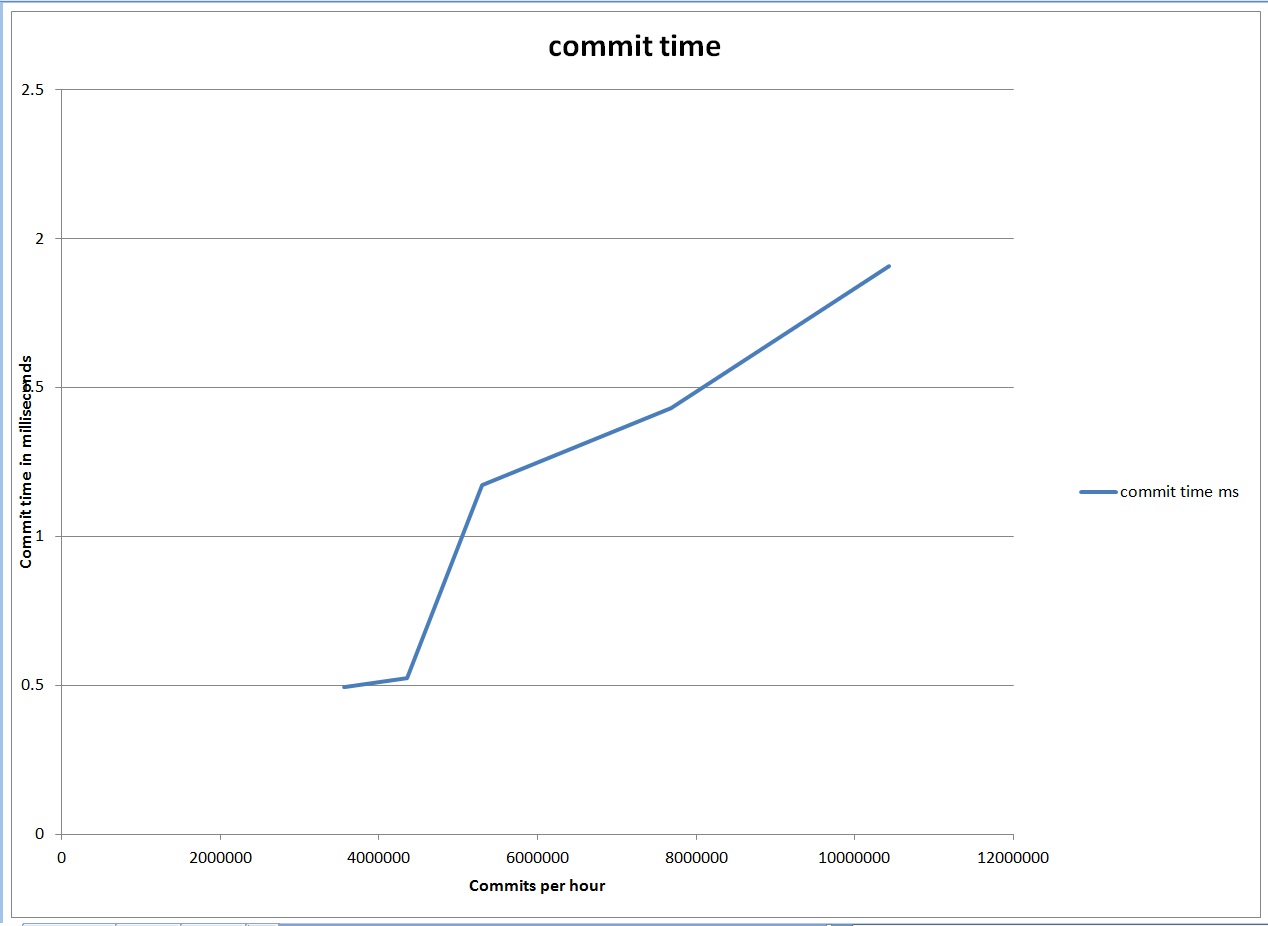
I think that an Oracle database must have some limit to commit scalability that relates more to the CPU used to process the commits instead of the writes to the redo logs. In these same tests the log file sync or commit time did increase slowly as the number of commits ramped up.
It started around half a millisecond at 3 million commits per hour and slowly grew to almost 2 milliseconds at 10 million commits per hour. So, commit time grew, but nothing like the original response time graph which went through the roof at around 3.6 million writes to the redo logs per hour.
Here is a zip of the scripts I used to generate the data, the spreadsheets I used to make the charts, and the results from the tests: zip
To run the tests yourself enter your own username and password at the top of setup.sql, commits.sql, and report.sql. Run one of the five reports – run1.sh, run2.sh, run5.sh, run10.sh or run20.sh like this:
./run5.sh
Wait for the last process to finish outputting then run the report:
./report.sh
Results look like this:
WAIT_EVENT ELAPSED_SECS WAITS_PER_HOUR WAITS_PER_SECOND AVG_WAIT_MS AVG_WAIT_SEC ----------------------- ------------ -------------- ---------------- ----------- ------------ log file parallel write 542 3008922.51 835.811808 .648076577 .000648077 log file sync 542 5306207.38 1473.94649 1.1727226 .001172723
I’m really just getting started understanding how commits scale, but it was surprising to me how hard it was to get the rate of redo log writes high enough to cause the write time to increase due to queuing. I assume this is because the database batches commits together more efficiently that I expected, which makes commits more scalable than I realized.
– Bobby
P.S. This is on HP-UX 11.31, Itanium, Oracle 11.2.0.3.0
Well, I finally passed the Oracle Certified Professional (OCP) 12c upgrade exam, 1Z0-060. I got 86% right on the new features section and 78% correct on the general DBA section. So, that means I missed roughly 7 questions on each section which was more than I expected because I felt good about all of my answers.
I’m happy with the three resources I used which are:
I spent a lot of time in the 12c manuals. Be careful, though, because the 12.1.0.2 manuals just came out and some things are different in 12.1.0.2 from the test, because the test designers based the test on 12.1.0.1.
I built two Linux virtual machines for test preparation. On one I installed the 12.1.0.1 database software and created a CDB and a non-CDB for testing. On the other I installed the grid software and database software and created a CDB on ASM disks. I spent many hours testing 12c features on these two environments and three databases.
I learned a ton both about new 12c features and features that exist in earlier versions, but it was a long and tedious process and I’m glad to finally be done.
– Bobby
I came up with a simple query that shows a running SQL executing a different plan than what it had in the past. Here is the query:
-- show currently executing sqls that have history -- but who have never run with the current plan -- joins v$session to v$sql to get plan_hash_value of -- executing sql. -- queries dba_hist_sqlstat for previously used values -- of plan_hash_value. -- only reports queries that have an older plan that is -- different from the new one. select vs.sid, vs.sql_id, vs.last_call_et, sq.plan_hash_value from v$session vs, v$sql sq where vs.sql_id=sq.sql_id and vs.SQL_CHILD_NUMBER=sq.child_number and sq.plan_hash_value not in (select ss.plan_hash_value from dba_hist_sqlstat ss where ss.sql_id=sq.sql_id) and 0 < (select count(ss.plan_hash_value) from dba_hist_sqlstat ss where ss.sql_id=sq.sql_id);
Example output:
SID SQL_ID LAST_CALL_ET PLAN_HASH_VALUE ---------- ------------- ------------ --------------- 229 cq8bhsxbbf9k7 0 3467505462
This was a test query. I ran it a bunch of times with an index and then dropped the index after creating an AWR snapshot. The query executed with a different plan when I ran it without the index. The same type of plan change could happen in production if an index were accidentally dropped.
I’m hoping to use this query to show production queries that have run in the past but whose current plan differs from any that they have used before. Of course, a new plan doesn’t necessarily mean you have a problem but it might be helpful to recognize those plans that are new and that differ from the plans used in the past.
– Bobby
I did a quick check of some facts I’m studying about Oracle 12c and its new threaded execution mode. I set this parameter:
alter system set THREADED_EXECUTION=true scope=spfile;
I had to connect SYS as SYSDBA with a password to get the system to bounce.
Then it had these processes only:
oracle 1854 1 0 09:17 ? 00:00:00 ora_pmon_orcl oracle 1856 1 0 09:17 ? 00:00:00 ora_psp0_orcl oracle 1858 1 2 09:17 ? 00:00:00 ora_vktm_orcl oracle 1862 1 3 09:17 ? 00:00:00 ora_u004_orcl oracle 1868 1 99 09:17 ? 00:00:17 ora_u005_orcl oracle 1874 1 0 09:17 ? 00:00:00 ora_dbw0_orcl
This differs from some of my 12c OCP study material but agrees with the manuals. Only pmon, psp, vktm, and dbw have dedicated processes.
Also, I found that I needed this value in the listener.ora:
dedicated_through_broker_listener=on
I needed that value to connect using a thread. Before I put that in it spawned a dedicated server process when I connected over the network.
Lastly, contrary to what I had read I didn’t need to set the local_listener parameter to get the new connections to use a thread:
SQL> show parameter local_listener NAME TYPE VALUE ------------------------------------ ----------- --------------------- local_listener string
– Bobby
I just finished reading Sam Alapati’s 12c OCP upgrade book for the first time and I really like it because of the content that it covered which I hadn’t discovered through my study of the Oracle manuals. Also, it did a good job explaining some things that Oracle’s manuals left unclear.
After reading each chapter I took the end of chapter test and got between 60% and 75% of the questions right. Next I plan to take the computer based test that was on the CD that came with the book and which covers both parts of the upgrade exam.
I did find minor errors throughout the book, but I still found it very useful especially after having already studied the same topics on my own without a study guide like this one to direct me. The author’s insights into the test and the material it covers adds value because they guide me to the areas that I need to focus on.
– Bobby