
Fix index corruption found using analyze table validate structure

We have struggled with a corrupted database and have gone through too many issues and challenges to document in a blog post. But, I thought I would document the fix to some index corruption that I found during the process. This is all on Red Hat 64 bit Linux Oracle 12.1.0.2 database.

A couple of coworkers of mine built a clone of the corrupt production database and my job was to see if there was any corruption left after they applied fixes to the known issues. I decided to work through Oracle Support’s documentation about fixing corruption. I started with this high level document:

Master Note for Handling Oracle Database Corruption Issues (Doc ID 1088018.1)

This document led me to first try using RMAN to find any remaining corruption. I followed this document:

How to identify all the Corrupted Objects in the Database with RMAN (Doc ID 472231.1)

I just ran the recommended simple commands:

rman target /

backup validate check logical database;

There was no corruption.

Next I started working through this Oracle Support document:

Identify the Corruption Extension for Block Corruption, Table/Index Inconsistency, Data Dictionary and Lost Writes (Doc ID 836658.1)

I liked the idea of looking for corruption for lost writes because we saw a number of internal errors that seemed to point to lost writes. These are some of the errors that we saw in production:

ORA-00600: internal error code, arguments: [kdifind:kcbz_objdchk]
ORA-00600: internal error code, arguments: [4137], [47.32.257993]
ORA-00600: internal error code, arguments: [kdsgrp1]
ORA-00600: internal error code, arguments: [ktprPURT_badundo]
ORA-00600: internal error code, arguments: [kturbleurec1]

So, the next check I did was with the dbv command based on the Oracle support document. I wrote this query to build all the dbv commands:

select 
'dbv file='||FILE_NAME||' blocksize='||
(select value from v$parameter where name='db_block_size')
from dba_data_files
order by FILE_NAME;

This produced commands like this:

dbv file=/u01/app/oracle/oradata/orcl/example01.dbf blocksize=8192

None of the dbv commands showed any corruption. So, I was beginning to think we had a clean system but then I tried the analyze table validate structure command from the same Oracle Support document and found corruption. I ran the command against every table. I had to run utlvalid.sql out of the $ORACLE_HOME/rdbms/admin directory to create the invalid_rows table. Then I ran these queries to build all the analyze commands:

select 
'analyze table '||owner||'."'||table_name||
'" validate structure cascade;'
from dba_tables
where PARTITIONED='NO'
order by owner,table_name;


select 
'analyze table '||owner||'."'||table_name||
'" validate structure cascade into invalid_rows;'
from dba_tables
where PARTITIONED='YES'
order by owner,table_name;

I ran the script that these queries built and got these errors:

ORA-01499: table/index cross reference failure - see trace file
ORA-00054: resource busy and acquire with NOWAIT specified or timeout expired

I ran the analyze commands again on the ones with resource busy and they ran without error. But I had three that consistently failed with ORA-01499. They were these three system tables:

SYS.WRH$_SEG_STAT_OBJ
SYS.WRH$_SQLTEXT
SYS.WRH$_SQLSTAT

This led me to yet another Oracle Support document to help diagnose the ORA-01499 errors:

ORA-1499. Table/Index row count mismatch (Doc ID 563070.1)

I needed to find the trace files that the analyze command created for each table. So, I ran the analyzes like this:

alter session set max_dump_file_size = unlimited;
ALTER SESSION SET tracefile_identifier = 'bobbydurrett';
analyze table SYS."WRH$_SQLSTAT" 
validate structure cascade into invalid_rows;

This put my name in the trace file name so I could find it easily. I found a line like this in the trace file for each command:

row not found in index tsn: 1 rdba: 0x00817bfa

I ran the script from the Oracle Support document like this:

SELECT owner, segment_name, segment_type, partition_name
FROM DBA_SEGMENTS
WHERE header_file = (SELECT file# 
                     FROM   v$datafile 
                     WHERE  rfile# =
 dbms_utility.data_block_address_file(
to_number('00817bfa','XXXXXXXX'))
                       AND  ts#= 1)
AND header_block = dbms_utility.data_block_address_block(
to_number('00817bfa','XXXXXXXX'));

This led me to the corrupt indexes:

SYS
WRH$_SQLSTAT_INDEX
INDEX PARTITION
WRH$_SQLSTA_2469445177_11544

SYS
WRH$_SEG_STAT_OBJ_INDEX
INDEX

SYS
WRH$_SQLTEXT_PK
INDEX

I ran these commands to fix the first two:

alter index SYS."WRH$_SQLSTAT_INDEX" 
modify partition WRH$_SQLSTA_2469445177_11544 unusable;

alter index SYS."WRH$_SQLSTAT_INDEX" 
rebuild partition WRH$_SQLSTA_2469445177_11544;

alter index SYS."WRH$_SEG_STAT_OBJ_INDEX" unusable;

alter index SYS."WRH$_SEG_STAT_OBJ_INDEX" rebuild;

But then I found that SYS.”WRH$_SEG_STAT_OBJ_PK was also corrupt but the rebuild failed:

SQL> alter index SYS."WRH$_SEG_STAT_OBJ_PK" rebuild;
alter index SYS."WRH$_SEG_STAT_OBJ_PK" rebuild
*
ERROR at line 1:
ORA-01452: cannot CREATE UNIQUE INDEX; duplicate keys found

This led me to yet another Oracle Support document:

ORA-01452: Cannot Create Unique Index; Duplicate Keys Found (Doc ID 332494.1)

I had to use these steps on both WRH$_SEG_STAT_OBJ_PK and WRH$_SQLTEXT_PK. I’m not sure why they had duplicate rows but I assume it was due to the index corruption.

SQL> select rowid,DBID, TS#, OBJ#, DATAOBJ#, CON_DBID 
from SYS.WRH$_SEG_STAT_OBJ
where  rowid not in (select min(rowid) from SYS.WRH$_SEG_STAT_OBJ 
group by DBID, TS#, OBJ#, DATAOBJ#, CON_DBID);  2

ROWID                    DBID        TS#       OBJ#   DATAOBJ#   CON_DBID
------------------ ---------- ---------- ---------- ---------- ----------
AAACEhAACAAA5nMAAi 2469445177         13     373044     373044 2469445177

SQL> alter session set skip_unusable_indexes=true;

Session altered.

SQL> alter table SYS.WRH$_SEG_STAT_OBJ 
disable constraint WRH$_SEG_STAT_OBJ_PK;

Table altered.

SQL> delete from SYS.WRH$_SEG_STAT_OBJ 
where rowid='AAACEhAACAAA5nMAAi';

1 row deleted.

SQL> commit;

SQL> CREATE UNIQUE INDEX SYS.WRH$_SEG_STAT_OBJ_PK 
ON SYS.WRH$_SEG_STAT_OBJ
  2  (DBID, TS#, OBJ#, DATAOBJ#, CON_DBID)
  3  LOGGING
  4  TABLESPACE SYSAUX
  5  PCTFREE    10
  6  INITRANS   2
  7  MAXTRANS   255
  8  STORAGE    (
  9              INITIAL          64K
 10              NEXT             1M
 11              MINEXTENTS       1
 12              MAXEXTENTS       UNLIMITED
 13              PCTINCREASE      0
 14              BUFFER_POOL      DEFAULT
 15             );

Index created.

SQL> alter table SYS.WRH$_SEG_STAT_OBJ 
enable  constraint WRH$_SEG_STAT_OBJ_PK;

Table altered.

I didn’t need the skip_unusable_indexes alter command so I left it off for the second PK index:

alter table SYS.WRH$_SQLTEXT disable constraint WRH$_SQLTEXT_PK;

select rowid,DBID, SQL_ID, CON_DBID from SYS.WRH$_SQLTEXT
where  rowid not in (select min(rowid) from SYS.WRH$_SQLTEXT 
group by DBID, SQL_ID, CON_DBID); 

delete from SYS.WRH$_SQLTEXT where rowid='AAACBvAACAABB6UAAE';

commit;

CREATE UNIQUE INDEX SYS.WRH$_SQLTEXT_PK ON SYS.WRH$_SQLTEXT
(DBID, SQL_ID, CON_DBID)
LOGGING
TABLESPACE SYSAUX
PCTFREE    10
INITRANS   2
MAXTRANS   255
STORAGE    (
            INITIAL          64K
            NEXT             1M
            MINEXTENTS       1
            MAXEXTENTS       UNLIMITED
            PCTINCREASE      0
            BUFFER_POOL      DEFAULT
           );
           
alter table SYS.WRH$_SQLTEXT enable constraint WRH$_SQLTEXT_PK;

Sorry that this post is so long but I thought it would be fun to document my index corruption journey. It was mostly a matter of navigating Oracle Support’s web site and following their recommendations. But, I thought it might help to document this particular situation and some of my queries.

Bobby
Posted in Uncategorized | 9 Comments

Result cache latch contention

I recently saw a dramatic example of result cache latch contention. I had just upgraded a database to 11.2.0.4 and several hours later processing pretty much came to a halt.

Of course I am telling you the end before I tell you the beginning. It all started the morning of July 22nd, 2017, a few weeks back. We had worked for a couple of months on an 11.2.0.4 upgrade. I mentioned some issues with the same upgrade in my earlier post. I spent several hours Saturday morning upgrading the database and it all went very smoothly. Then we kicked off the normal batch processing and things seemed fine. Around 1 am the next morning I get paged about an issue. All of the batch processing had ground to a halt on the upgraded database. Needless to say, I was freaking out and afraid that we would have to back out the upgrade. This would have been ugly and time-consuming.

At first I  focused on the top SQL statements in the AWR report. Here are the top few from that morning:

Elapsed Time (s) Executions Elapsed Time per Exec (s) %Total %CPU %IO SQL Id SQL Module SQL Text
17,983.20 452,555 0.04 43.98 10.64 0.00 4yw0zv7ty2t47 SQL*Plus SELECT SLS_EXCL_RSN FROM ( SEL…
3,643.96 0 8.91 13.68 0.19 2fxnrcamtbcc2 SQL*Plus DECLARE return_code number := …
3,637.60 0 8.90 3.67 0.06 18pdd22fh15dc SQL*Plus INSERT /*+ APPEND PARALLEL(TGT…

The top query dominates the others because it takes 43.98% of the total run time so it made sense that this query was the problem. I expected that some queries would change plan with the upgrade. I had used SQL Profiles to lock in other plans that I knew were problematic but I would not be surprised to see new ones. But, looking at the top SQL, sql id 4yw0zv7ty2t47, the plan was the same as before the upgrade. Here is some execution history of the query before and after the July 22 upgrade:

SQL_ID        PLAN_HASH_VALUE END_INTERVAL_TIME         EXECUTIONS_DELTA Elapsed Average ms
------------- --------------- ------------------------- ---------------- ------------------
4yw0zv7ty2t47       848116227 15-JUL-17 11.00.28.230 PM           192430         .822087045
4yw0zv7ty2t47       848116227 16-JUL-17 02.00.24.144 AM          2522505         .691503149
4yw0zv7ty2t47       848116227 16-JUL-17 03.00.42.580 AM          2787002         .793723611
4yw0zv7ty2t47       848116227 22-JUL-17 10.00.12.787 PM           220581         23.4686899
4yw0zv7ty2t47       848116227 22-JUL-17 11.00.30.251 PM           455887         20.1393904
4yw0zv7ty2t47       848116227 23-JUL-17 12.00.47.394 AM           445173         20.5407455
4yw0zv7ty2t47       848116227 23-JUL-17 01.00.05.711 AM           369333         28.3195315
4yw0zv7ty2t47       848116227 23-JUL-17 02.00.22.811 AM           465591         39.0232079
4yw0zv7ty2t47       848116227 23-JUL-17 03.00.40.758 AM           452555         39.7370594
4yw0zv7ty2t47       848116227 23-JUL-17 04.00.57.968 AM           458328         39.3421407
4yw0zv7ty2t47       848116227 23-JUL-17 04.09.32.144 AM            10055         39.1518787
4yw0zv7ty2t47       848116227 23-JUL-17 04.11.58.484 AM            18507         39.6002968
4yw0zv7ty2t47       848116227 23-JUL-17 04.15.24.661 AM             5215         39.4672715
4yw0zv7ty2t47       848116227 23-JUL-17 04.16.30.441 AM             8542         39.1123689
4yw0zv7ty2t47       848116227 23-JUL-17 05.00.15.147 AM           321635         39.9827259

So, I stared at this for a couple of hours, getting more and more stressed because my cure-all SQL Profile was not going to help in this situation. The plan had not changed. I could not think, in my sleep deprived state, of a way to resolve this issue that morning. Then, after a quick prayer for help, I noticed the %CPU and %IO columns in the query’s line in the AWR report. 10% CPU, 0% I/O. The query was spending 90% of its time waiting and doing nothing. I had noticed some latch waits on the AWR report but I thought that the CPU on the system was just busy so we had some latch waits.

These were the top three events:

Event Waits Total Wait Time (sec) Wait Avg(ms) % DB time Wait Class
latch free 3,658,537 26.9K 7 65.8 Other
DB CPU 4749 11.6
db file scattered read 71,549 142.1 2 .3 User I/O

But, now finally I looked back at the latch waits. I went down to the latch section of the AWR report and the Result Cache: RC Latch latch showed up big:

Latch Sleep Breakdown

Latch Name Get Requests Misses Sleeps Spin Gets
Result Cache: RC Latch 6,742,176 4,142,777 4,143,709 669,430
row cache objects 5,804,568 169,324 6,087 163,272
cache buffers chains 107,393,594 36,532 5,859 30,976

I had noticed the RESULT_CACHE hint in some queries on our test database but never saw the latch contention. Here is the first part of the problem query with the RESULT_CACHE hint.

SQL_ID 4yw0zv7ty2t47
--------------------
SELECT SLS_EXCL_RSN FROM ( SELECT /*+ PARALLEL RESULT_CACHE */ DISTINCT

Here is part of the plan with the result cache step:

Plan hash value: 848116227
------------------------------------------
| Id  | Operation                        |
------------------------------------------
|  11 |  COUNT STOPKEY                   |
|  12 |   VIEW                           |
|  13 |    RESULT CACHE                  |
------------------------------------------

Early in the morning I got the idea of disabling the result cache. I ran this command:

alter system set result_cache_max_size=0 scope=both;

All of the running queries immediately died with this error:

ORA-00600: internal error code, arguments: [qesrcDO_AddRO],…

But, when the jobs were rerun they quickly went to completion. I checked the query performance before and after disabling the result cache and before the upgrade as well and found that post upgrade without the result cache the query ran ten times faster than before.

SQL_ID        PLAN_HASH_VALUE END_INTERVAL_TIME         EXECUTIONS_DELTA Elapsed Average ms
------------- --------------- ------------------------- ---------------- ------------------
4yw0zv7ty2t47       848116227 15-JUL-17 11.00.28.230 PM           192430         .822087045
4yw0zv7ty2t47       848116227 16-JUL-17 02.00.24.144 AM          2522505         .691503149
4yw0zv7ty2t47       848116227 16-JUL-17 03.00.42.580 AM          2787002         .793723611
4yw0zv7ty2t47       848116227 22-JUL-17 10.00.12.787 PM           220581         23.4686899
4yw0zv7ty2t47       848116227 22-JUL-17 11.00.30.251 PM           455887         20.1393904
4yw0zv7ty2t47       848116227 23-JUL-17 12.00.47.394 AM           445173         20.5407455
4yw0zv7ty2t47       848116227 23-JUL-17 01.00.05.711 AM           369333         28.3195315
4yw0zv7ty2t47       848116227 23-JUL-17 02.00.22.811 AM           465591         39.0232079
4yw0zv7ty2t47       848116227 23-JUL-17 03.00.40.758 AM           452555         39.7370594
4yw0zv7ty2t47       848116227 23-JUL-17 04.00.57.968 AM           458328         39.3421407
4yw0zv7ty2t47       848116227 23-JUL-17 04.09.32.144 AM            10055         39.1518787
4yw0zv7ty2t47       848116227 23-JUL-17 04.11.58.484 AM            18507         39.6002968
4yw0zv7ty2t47       848116227 23-JUL-17 04.15.24.661 AM             5215         39.4672715
4yw0zv7ty2t47       848116227 23-JUL-17 04.16.30.441 AM             8542         39.1123689
4yw0zv7ty2t47       848116227 23-JUL-17 05.00.15.147 AM           321635         39.9827259
4yw0zv7ty2t47       848116227 23-JUL-17 05.20.37.524 AM           329457          17.895581
4yw0zv7ty2t47       848116227 23-JUL-17 05.21.15.363 AM           205154         .050141323
4yw0zv7ty2t47       848116227 23-JUL-17 05.25.07.159 AM          1023657         .049949389

If you look through the output you will see that pre-upgrade on July 16th the query averaged about .69 to .79 milliseconds. During the latch contention on July 23rd it averaged about 39 milliseconds, a lot worse. But, after disabling the result cache it averaged .05 milliseconds which is at least 10 times faster than with the result cache before the upgrade.

So, it seems that the result cache hint on this query has always slowed it down. But, the upgrade and the load afterward caused some intense latch contention that we had not seen before. But, it is very cool that disabling the result cache actually made the query faster than it has been in the past.

I don’t think that it makes sense to put a RESULT_CACHE hint in a query that will run in .05 milliseconds without it. The overhead of the result cache made the query run 10 times slower at least. Something about the upgrade resulted in latch contention that caused a system wide problem, but disabling the result cache made the query run faster than it ever had. We could have avoided this problem by leaving off the RESULT_CACHE hint, but it was nice that I could resolve the problem quickly by disabling the result cache using a parameter change.

Bobby

Posted in Uncategorized | 3 Comments

Two configuration changes with 11.2.0.4 upgrade

A couple of weeks ago I upgraded a major production database from 11.1.0.7 to 11.2.0.4. Our developers kept hitting one ugly bug after another on the minimally patched 11.1.0.7 so I wanted to get them on the most patched up version of Oracle 11. This is on HP-UX Itanium 11.31. I made two key configuration changes that I want to discuss here. I changed the database to use direct I/O and I set a parameter so that the database would not use direct path reads for most table and partition scans. The main point of this blog post is that one change required the other. I moved to direct I/O to improve checkpoint performance but that slowed down queries that repeatedly scanned segments using direct path reads. I set an underscore parameter that prevented direct path reads except on very large table scans and that sped the problem queries back up to normal.

In our testing a coworker ran a massive number of updating jobs at the same time. A truncate took about an hour during this excessive load. I ran a simple test script to truncate a small table during this load and it took over a minute. The truncate spent almost all of its time on these two waits:

  1. local write wait – 61%
  2. enq: RO – fast object reuse – 38%

This was on a Delphix clone of production so the NFS file systems were already forcing the database to use direct I/O. But, I had to max out the database writer processes to get the needed checkpoint performance. I based this decision on my experience with checkpoint performance on another database which I documented in this post: url. I set these parameters:

  1. filesystemio_options=directIO
  2. db_writer_processes=36
  3. dbwr_io_slaves=0

We use these settings on a large data warehouse staging database on 11.2.0.4 and HP-UX 11.31 to tune checkpoint performance there. So, we have tested this configuration in production for several years.

After changing these parameters the truncates ran fast under the same heavy updating load.

We remounted the database file systems with mincache=direct, convosync=direct options on our non-Delphix physical databases when we moved them to direct I/O.

For a long time I have seen issues with slowness of full partition scans on our Delphix clones of the production database that this post is about. Here is a post about this issue: url. I remember hearing about an undocumented underscore parameter that you could use to prevent direct path reads and always meant to look into it but kept holding back. I didn’t want to set the underscore parameter on my Delphix copies of production and not set it on my physical production database. That would make our test database different from production and that could lead to invalid testing. But, an upgrade was a great time to put the parameter in both on Delphix and in production. This was the parameter that I put in:

_small_table_threshold=1000000

I read several good blog posts about this parameter and other ways to deal with direct path reads in Oracle 11. Evidently some behavior changed in Oracle 11 that caused full scans to bypass the buffer cache in more situations, using direct path reads. Some post talked about DBA’s just bumping up the value for _small_table_threshold when they upgraded to Oracle 11 so I tried it and testing proved it out. Here is an earlier post about my work with this parameter: url.

So, the upgrade has given me a chance to not only move our database to a more patched up, and hopefully stable, release but it also was a chance to make two key configuration changes. Without direct I/O our production database was using the Unix file system cache to cache the blocks that were being repeatedly scanned using direct path reads. But, to switch to direct I/O I had to end the direct path reads so that the database buffer cache would be used to cache the scanned blocks. Direct I/O and the 36 database writer processes gave us great checkpoint performance. Disabling direct path read kept the queries that had depended on the Unix filesystem cache running just as fast by allowing them to use the database buffer cache.

Bobby

Posted in Uncategorized | Leave a comment

September AZORA meeting

The September AZORA meeting has a great lineup of speakers. AZORA is the Arizona Oracle User Group. Republic Services is providing us with an excellent place to meet off of the 101. I’m looking forward to it. Check it out if you are in the Phoenix area.

Bobby

https://www.meetup.com/Arizona-Oracle-User-Group/events/242201536/


Posted in Uncategorized | Leave a comment

Updated PythonDBAGraphs to work from IDLE

I switched from Enthought Canopy to IDLE for Python development when I got my new corporate laptop a few weeks back. Yesterday I realized that I was unable to run a Matplotlib graph from IDLE in my current configuration. Also, I could not find a way to pass command line arguments into my Pyth0nDBAGraphs scripts from IDLE. So, I put in a couple of fixes including an update to the README.md explaining how to pass arguments into my scripts when using IDLE. This describes the problem I was having running Matplotlib graphs in IDLE: stackoverflow article.

I only use IDLE for development. I run my PythonDBAGraphs from the Windows command prompt when I am using them for my database work. Also, I use TextPad and the command line version of Python for development as well as graphical tools like IDLE or Canopy. But, I wanted to use IDLE for development of graphs so I came up with these fixes.

Bobby

Posted in Uncategorized | Leave a comment

Read Oracle Database 12.2 New Features Manual

I just finished reading the Oracle database 12.2 new features manual. I have postponed looking at 12.2 until now because for a long time 12.2 was not available for download even though it was available in Oracle’s cloud. Once the download became available I installed 12.2 in a test virtual machine but did not get any further than that. But, the first quarterly update of 12.2 is supposed to come out soon so I thought that I would at least read about the new features to start learning about it.

I wrote earlier about reading the Snowflake documentation. Reading the Oracle new features guide made me wonder about cases where both products are working on the same goals. Oracle 12.2 seems to have some new features for data analysis or analytics that relate to approximate results. Maybe these features are similar to Snowflake’s cardinality approximation routines? There are also a lot of new features related to JSON, which is a key Snowflake reality.

There are In-Memory database enhancements which is no surprise since this is a newer feature. Similarly, there are a ton of CDB and PDB database feature enhancements since multitenant was a major new feature in 12.1. Of course multitenant connects to Oracle’s cloud strategy so it is no surprise that Oracle included cloud enabling features in 12.2.

There are a ton of changes to Oracle features that I don’t use like Data Guard. I’ve seen some GGS but never used Data Guard. I recently saw a presentation at a user group meeting, I think it was at AZORA, where a presenter discussed the new 12c features of Data Guard. That user meeting plus the 12.2 new features manual together make me think that Oracle Data Guard has a massive amount of features that I am not aware of and not using.

I love the way Oracle keeps expanding their online operations. I think that 12.2 has a lot of features that would really help data warehouses. I’m also really excited about 12.2’s improvements in cross-platform migration. I have a couple of large databases that I need to migrate to Linux from HP-UX. 12.2 may have features that will help with these migrations. I’m really excited about the Data Pump parallel import of Metadata. It looks like our cross-platform database moves would need to load tens of thousands of objects. It would be awesome to do that metadata load in parallel. There are also a lot of enhancements related to Exadata. It would be nice to run a data warehouse on Exadata on 12.2.

Oracle’s sharding features make me think of Oracle trying to compete with other databases including cloud and open source systems. Oracle has everything but the kitchen sink all under one database. But, maybe less expensive databases with a subset of the features that Oracle has will work well in particular situations. It’s hard to know. I’ve been working with Oracle for 20 plus years so I think it helps to use a tool that I’m familiar with and there is no doubt that Oracle has many great features. But I wonder if Oracle is so expensive for some use cases that it makes sense to use less expensive and less capable software that fits specific needs.

I’m sorry if this post is kind of stream of consciousness writing. I reviewed the parts of the manual where I underlined something or made notes. I was pretty negative about Oracle 12.2 when Oracle announced that it would only be available in the cloud. I had a free cloud account that I could have used to mess with 12.2 but I knew that we were not going to use it until I could download it. The fact that 12.2 is available for download and that Oracle is starting to release quarterly patch updates motivated me to start looking at it. I have only just begun. I only read the new features manual. But, I am a lot more positive about 12.2 than before. It would be great if the cross-platform features were all that I hope that they are. That would help meet a real need. Anyway, I enjoyed reading about the new features in 12.2. It makes me want to get going with it to see if it can really help us.

Bobby

Posted in Uncategorized | Leave a comment

SQR with 077 umask creates file with 611 permissions

I ran across this strange situation. An SQR opened a new data file for output and created the file with 611 permissions. We needed group read access so this caused a problem. I knew that our login script for the PeopleSoft Unix user set umask to 022 but that without running the login scripts the mask is 077. So, my first thought was that we had started the process scheduler without running the login scripts and the mask was 077. But, why would the file that the SQR created be 611 permissions and not 600? The 077 mask should get rid of all the group and others bits. I built a simple test case to show that the SQR creates the file with 611 permissions with a 077 mask.

Here is the test SQR:

begin-report
  Let $Unix_Cmd = 'umask'
  Call System Using $Unix_Cmd #Status
  Let $Unix_Cmd = 'rm /tmp/bobby/bobby.txt'
  Call System Using $Unix_Cmd #Status
  let $testfile = '/tmp/bobby/bobby.txt'
  open $testfile as 1 for-writing  record=1500:fixed
  close 1
  Let $Unix_Cmd = 'ls -l /tmp/bobby/bobby.txt'
  Call System Using $Unix_Cmd #Status
end-report

Here is its output:

SQR for PeopleSoft V8.53.05
077
-rw---x--x   1 psoft      psoft            0 Jun 23 10:54 /tmp/bobby/bobby.txt

Notice the execute bits for group and others.  Why were they not masked out? Also, the default permissions to create a file is 644. So, creating a new file should not set the execute bits at all no matter what mask you are using.

I created a Korn shell script to do the same thing as the SQR:

umask
rm /tmp/bobby/bobby.txt
touch /tmp/bobby/bobby.txt
ls -l /tmp/bobby/bobby.txt

Here is its output:

077
-rw-------   1 psoft      psoft            0 Jun 23 10:58 /tmp/bobby/bobby.txt

Notice that there are no group and others bits which is what I expected with a 077 mask. I tried searching the Internet for SQR and 611 permissions but could not find anything.

As it turns out, we did start the process scheduler with umask 077 so I just modified the script that started it to set umask 022 and that resolved the problem. Here is the output from my test SQR with umask 022:

SQR for PeopleSoft V8.53.05
022
-rw-r--r--   1 psoft      psoft            0 Jun 23 11:01 /tmp/bobby/bobby.txt

This is what we wanted and of course the Korn shell script does the same thing as it should.

022
-rw-r--r--   1 psoft      psoft            0 Jun 23 11:02 /tmp/bobby/bobby.txt

Seems very odd to me. Anyway, I hope that this post helps someone.

This was on HP-UX 11.31 and PeopleTools 8.53.05

Bobby

Posted in Uncategorized | Leave a comment

Unrolling loop speeds up program

This is a follow-up to my earlier post about the assembly language book that I am working through. I have struggled to speed up a program using something that the book recommends, unrolling a loop. I think I have finally found an example where unrolling a loop speeds up a program so I wanted to share it.

I am working on Chapter 17 Exercise 2 of the book which asks you to write a program to find the longest common substring from two strings. I choose an inefficient and simple way to find the common substring and tried to speed the program up without changing the algorithm.

Here is the C version on GitHub: url

The core of the program is three loops. The outer loop tries each character in string 1 as the start of the substring. The middle loop tries each character in string 2 as the start of the substring. The inner loop advances through both strings until it finds the end of the common substring.

The C version ran in 27.2 seconds.

I built an assembly version that uses registers for most of the variables and it ran in about 11.7 seconds. It has the same three loops. Assembly register version: url

I tried to improve on the 11.7 seconds by unrolling each of the three loops. Unrolling the outer and inner loops resulted in no improvement in runtime. I was about to give up but finally decided to try unrolling the middle loop and it caused the program to run in 10.2 seconds. Very cool. Assembly unrolled middle loop version: url

I had to figure out how to use %rep, %assign, and how to have a label that I based on a nasm variable such as .skipif %+ i.

Kind of fun. I realize that this is off topic for my “DBA Blog” but it is something I’m playing with so I thought I would throw it out there. It doesn’t hurt a DBA to know some low-level computer science, even if you are not using it directly in your job. Anyway, it was a bit of a struggle to come up with an example that was faster with the loop unrolling and I think that I have found one.

Bobby

P.S. Came across the term “loop unrolling” in the Oracle 12.2 New Features Manual. The section titled “Oracle Database Java Virtual Machine Performance Enhancements” has the same sort of performance enhancements that the assembly language book describe including loop unrolling and using SIMD instructions. So, maybe this assembly stuff is not as far removed from a DBA’s job as I thought. It helps me understand this section of the new features manual.

Posted in Uncategorized | Leave a comment

Modified PythonDBAGraphs to use datetime on X axis

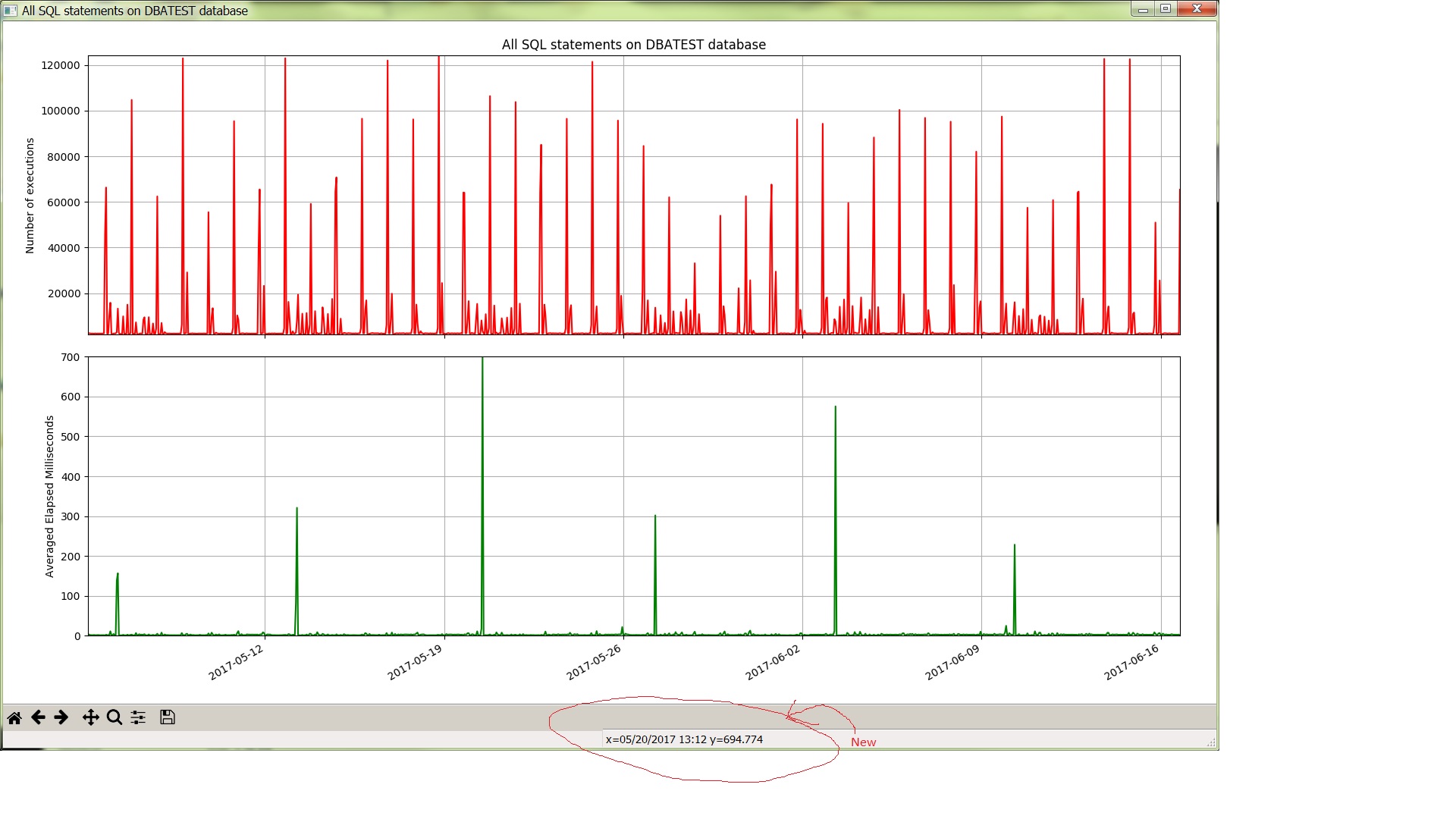
I modified PythonDBAGraphs to use datetime objects on the X axis for all the reports except ashcpu.py. This lets you hover the mouse over a point and see the date and time for the point. Previously I was using text strings as labels with dates and times on the X axis and it was not obvious which point was for which date and time.

Here is a screenshot:

I have an example of a graph using datetime objects in an earlier post: post

I used two very helpful pages from the Matplotlib documentation: doc, example

I uninstalled cx_Oracle 6 and went back to version 5.3. This resolved the bug I mentioned in my earlier PythonDBAGraphs post. This enabled me to take out the TO_CHAR function calls that I had just added to work around the bug. The SQL queries looks simpler and easier to understand now.

I modified the README.md to include my new list of installed packages.

I feel like these changes will make the existing graphs more useful to me. Also, the code and SQL queries are cleaner now so it will be easier for me to create new graphs in the future.

Bobby

Posted in Uncategorized | Leave a comment

Pushed out new version of PythonDBAGraphs

I pushed out a new version of PythonDBAGraphs. I got a new laptop at work so I am setting it up with the software that I need to do my job. I decided that instead of reinstalling Enthought Canopy I would go with the current version of Python 3 and install the packages that I need one at a time. This gives me a cleaner install and I’m on the most current version of Python and the packages. I had installed Canopy for the two edX classes that I took so I wasn’t motivated to uninstall it on my old laptop. I use PythonDBAGraphs just about every day for my work and I didn’t want to whack it by uninstalling Canopy on my old laptop and trying to install something new. But, now I have my old laptop as a backup so I was able to take the time to install Python 3 and the current packages. I have updated the README.md with details of my new configuration.

I had to make a number of changes in the code. I had to change <> to !=. I had to change print xyz to print(xyz). Also, I think I ran across a bug in the new version of cx_Oracle. Here is an example. Assume you have an open connection and cursor. The cursor is cur.

cur.execute('select to_char(blocks/7) from user_tables')
row = cur.fetchone()
print(row)

cur.execute('select blocks/7 from user_tables')
row = cur.fetchone()
print(row)

Here is the output:

('2.28571428571428571428571428571428571429',)
Traceback (most recent call last):
  File "bug.py", line 12, in 
    row = cur.fetchone()
ValueError: invalid literal for int() with base 10: '2.28571428571428571428571428571428571429'

Strange. The workaround is to take any numbers with fractional values and run to_char() on them. I made a number of changes in the code to work around this bug/feature.

Anyway, I’m glad that I moved to Python 3 and that it enables me to use pip to install just the packages I want. Hopefully this update will make PythonDBAGraphs more usable for others since not everyone has Canopy.

Bobby

P.S. Two things happened today, 6/9/2017. I found out how to put in a bug on the cx_oracle github site and it was quickly resolved so the fix will be in future releases. Second, I pulled the new version down to my old laptop and made a couple of simple changes to get my new version to still work on Python 2 and Canopy. Still works with the older version of matplotlib and cx_oracle as well.

Posted in Uncategorized | Leave a comment