Speed of Light

Looking at cloud databases has me thinking about the speed of light. Wikipedia says that the speed of light is about 186,000 miles per second. If my calculations are correct that is 5.37 microseconds per mile. The United States is about 2680 miles wide so it would take light about 14.4 milliseconds to cross the US. If I ping one of my favorite web sites it takes tens of milliseconds to ping so that kind of makes sense because those sites are in other cities and I am going through various routers. I did some tests with my company’s storage and found that reading from our storage when the data is cached in the storage server takes around 200 microseconds. That is 200 microseconds for a round trip. I’m sure that our database servers and storage are a lot less than a mile apart so most of that time has nothing to do with the speed of light. I heard about a cloud vendor whose fast network connection took 100 microseconds plus the speed of light. I guess 100 microseconds is the cost of getting your data to fiber and light does the rest. If your cloud database was on the other side of the country, I guess it could take 14 milliseconds each way at least for each SQL request. If the cloud database was in your own city and say 10 miles away that would only tack on about 53.7 microseconds each way to the 100 microseconds overhead. I guess it makes sense. Maybe 100 microseconds plus the speed of light is the cost of moving data in the best case?

Bobby

Posted in Uncategorized | 4 Comments

New utility Python scripts for DBAs

I pushed out three new Python scripts that might be helpful to Oracle DBAs. They are in my miscpython repository.

Might be helpful to some people.

Bobby

Posted in Uncategorized | 2 Comments

Slides from March AZORA meeting

Here are the slides from our March Arizona Oracle User Group (AZORA) meeting:

Daniel Morgan Security Master Class

We really appreciate Daniel Morgan taking the time to share this information about the increasingly important topic of database security.

Also, AZORA is always looking for people to present at future meetings. We have one more meeting in May before the blazing hot Arizona summer and then we start up again in September. Email be at bobby@bobbydurrettdba.com if you would like to speak at a future meeting.

Bobby

Posted in Uncategorized | Leave a comment

Oracle Database Security Master Class AZORA Meetup Thursday

Next Thursday Daniel Morgan from TidalScale will be giving a free Oracle Database Security Master Class for our March Arizona Oracle User Group meeting. See the details in our Meetup link:

https://www.meetup.com/Arizona-Oracle-User-Group/events/258858868/

Please RSVP so that we know how many people will be there.

Given the ever-increasing number of security threats to our databases this session on Oracle database security should be valuable to us all.

I hope to see you there!

Bobby

P.S. We are trying out a WebEx this time for remote attendees:

Join Webex meeting

Meeting number (access code): 743 918 204

Join by phone 
+1-855-797-9485 US Toll free 
+1-415-655-0002 US Toll 
Global call-in numbers  |  Toll-free calling restrictions

Posted in Uncategorized | Leave a comment

ORA-30926 on MERGE statement

I was on call last week and I got a ticket about a batch job that was failing on a MERGE statement with an ORA-30926 error. Our support team worked around it by deleting some duplicate rows in a table that was feeding into the MERGE. This week I wanted to go back and try to understand what would cause ORA-30926 errors on MERGE statements.

I read through some blog posts and Oracle support documents relating to ORA-30926 and merge. Then I tried building some simple test scripts to see when you get ORA-30926 on a MERGE. At the end of my search I came back to this simple statement from the 18c SQL Language Reference manual’s description of the MERGE statement:

MERGE is a deterministic statement. You cannot update the same row of the target table multiple times in the same MERGE statement.

I was puzzled by the term “deterministic” but “cannot update the same row…multiple times” seems simple enough. I created test scripts to show whether you can update the same row multiple times with a MERGE: zip

Here are the two test tables:

create table target (a number,b number);

create table source (a number,b number);

Here is data and a MERGE statement that causes the error:

SQL> insert into target values (1,1);
SQL> insert into source values (1,2);
SQL> insert into source values (1,3);

SQL> merge into target
  2  using source
  3  on (target.a = source.a)
  4  when matched then
  5  update set target.b=source.b;
using source
      *
ERROR at line 2:
ORA-30926: unable to get a stable set of rows in the source tables 

This seems very simple. We join the source and target tables on column A with value 1. The merge statement tries to update column B on the target table row twice. It tries to set it to 2 and then to 3. I guess this is where the term “deterministic” comes in. If the merge statement updated B to 2 and 3 which would it do first and which second?

The example above with values 2 and 3 for B makes good sense but I saw some odd behavior when I used source rows with 1 and 2 for the B values of the two rows. With B values of 1 and 2 in this case the MERGE does not get an error:

SQL> insert into target values (1,1);
SQL> insert into source values (1,1);
SQL> insert into source values (1,2);

SQL> merge into target
  2  using source
  3  on (target.a = source.a)
  4  when matched then
  5  update set target.b=source.b;

2 rows merged.

SQL> select * from target;

         A          B                                                           
---------- ----------                                                           
         1          2                                                           

This seems to contradict the idea that you cannot update the same row multiple times with a MERGE. In this case it seems like B is updated twice, once to 1 which is what it already was set to and then to 2. I guess this works because B was already set to 1 so the update of B to the same value does not count as an update. It seems like only one update took place and then B ends up set to 2.

This example does not work with a slightly different MERGE statement on Oracle 12.1 or earlier:

SQL> select banner from v$version;

BANNER                                                                          
--------------------------------------------------------------------------------
Oracle Database 12c Enterprise Edition Release 12.1.0.2.0 - 64bit Production    

SQL> merge into target
  2  using source
  3  on (target.a = source.a)
  4  when matched then
  5  update set target.b=source.b
  6  when not matched then
  7  insert values (source.a,source.b);
using source
      *
ERROR at line 2:
ORA-30926: unable to get a stable set of rows in the source tables 

SQL> select * from source;

         A          B                                                           
---------- ----------                                                           
         1          1                                                           
         1          2                                                           

SQL> 
SQL> select * from target;

         A          B                                                           
---------- ----------                                                           
         1          1                                                           

All that I can say based on these two tests is that sometimes an update of a column to the same value counts as an update and sometimes it does not. The preceding example works on 12.2:

SQL> select banner from v$version;

BANNER                                                                          
--------------------------------------------------------------------------------
Oracle Database 12c Enterprise Edition Release 12.2.0.1.0 - 64bit Production    

SQL> merge into target
  2  using source
  3  on (target.a = source.a)
  4  when matched then
  5  update set target.b=source.b
  6  when not matched then
  7  insert values (source.a,source.b);

2 rows merged.

SQL> select * from source;

         A          B                                                           
---------- ----------                                                           
         1          1                                                           
         1          2                                                           

SQL> 
SQL> select * from target;

         A          B                                                           
---------- ----------                                                           
         1          2                                                           

It all seemed so simple when I read the documentation. Maybe instead of saying:

You cannot update the same row of the target table multiple times in the same MERGE statement.

Instead it should say:

You may not be able to update the same row of the target table multiple times in the same MERGE statement.

We should not count on being able to update the same row multiple times with a single MERGE statement, but clearly there are some cases in which we can. If you are like me and you get paged on a job that fails with ORA-30926 on a MERGE, it makes sense to get rid of the multiple updates on a single row because you most likely have hit a case where it is not allowed.

Bobby

Posted in Uncategorized | 6 Comments

One query in MySQL Performance Schema

I am learning about MySQL performance tuning. I read the Performance Schema chapter of the MySQL 5.7 manual and I have a MySQL 5.7.20 database running under Linux. I have a test table and I am running a simple query that does a full scan of the table and returns the sum of a couple of columns. The goal was to look at some Performance Schema tables to see what they would tell me about this simple query. I bounce the MySQL database service before running my test script so that the query pulls data from disk and not memory. A zip of my test script and its output is here: zip

I looked at the tables that had this pattern events_*_history_long. These are the four tables:

There seems to be a hierarchical relationship among these tables something like this:

  • statements->transactions
  • statements->stages->waits->waits

There may be other relationships that my simple test did not capture. If you look at the zip you will see all the levels of the hierarchy that I explored but, in this case, the bottom level seems the most interesting. Here is the query that explores the bottom of the statements->stages->waits->waits path:

select * from events_waits_history_long
where
NESTING_EVENT_ID in 
(select EVENT_ID from events_waits_history_long
where
NESTING_EVENT_ID in 
(select EVENT_ID from events_stages_history_long
where
NESTING_EVENT_ID in 
(select EVENT_ID from events_statements_history_long
where SQL_TEXT like concat('%te','st%'))
and NESTING_EVENT_TYPE = 'STATEMENT')
and NESTING_EVENT_TYPE = 'STAGE')
and NESTING_EVENT_TYPE = 'WAIT'
order by EVENT_ID;

The output reminds me of a trace in Oracle. It shows the individual disk reads and waits for internal locks and mutexs.

Most of the time seems to be taken up on reads from a file, which is what I expected. If you look at the wait/io/file/innodb/innodb_data_file waits they seem to be 16384 byte reads from the file associated with the table. I could use this information to build a query to show a profile of the time spent by the query based on EVENT_NAME. It would be kind of like a tkprof of an Oracle trace.

This post is just a simple first test. I am new to MySQL tuning so feel free to leave a comment or email me if you have suggestions or corrections related to this post.

Bobby

P.S. Looking at this again, it does not look like the file reads are really physical I/O because they are too short. The TIMER_WAIT column uses picoseconds so if you divide 3499928 by 1000000 you should get 3.49 microseconds for the first read which is tiny compared to a normal disc read of 1000 microseconds or more. Also, I added up all the wait times from the statements->stages->waits->waits query and the total was about 100 times less than the query run time. The higher levels of this hierarchy all had waits in the half second range, but the lowest level of waits adds to about one hundredth of that. So, I have more work to do at this point.

P.P.S. Looks like the reads are all from memory. I looked at several things but here is a profile of the waits from the stage level and then at the wait level:

+-------------------------------------------+---------------+
| EVENT_NAME | total_seconds |
+-------------------------------------------+---------------+
| wait/io/table/sql/handler | 0.4819 |
| wait/io/socket/sql/client_connection | 0.0001 |
| wait/synch/mutex/sql/THD::LOCK_query_plan | 0.0000 |
| wait/synch/mutex/sql/LOCK_table_cache | 0.0000 |
| wait/synch/mutex/sql/THD::LOCK_thd_query | 0.0000 |
| wait/synch/mutex/innodb/trx_mutex | 0.0000 |
| wait/synch/mutex/sql/THD::LOCK_thd_data | 0.0000 |
+-------------------------------------------+---------------+
+-------------------------------------------+---------------+
| EVENT_NAME | total_seconds |
+-------------------------------------------+---------------+
| wait/io/file/innodb/innodb_data_file | 0.0041 |
| wait/synch/mutex/innodb/buf_pool_mutex | 0.0004 |
| wait/synch/sxlock/innodb/hash_table_locks | 0.0002 |
| wait/synch/mutex/innodb/fil_system_mutex | 0.0001 |
+-------------------------------------------+---------------+

It seems that the wait/io/table/sql/handler event includes the CPU to process the query which takes about half a second whereas the wait/io/file/innodb/innodb_data_file event seems to just cover the time to read the data from the buffer pool. Here is a zip of my script to create these profiles and its output: zip

I got a profile of the query another way and that confirmed that almost all of the half second run time of the query was CPU:

Sending data spends .52 seconds on the CPU which is most of the query’s .54 second run time in this case.

P.P.P.S. This post, https://mysql.wisborg.dk/2018/08/05/what-does-io-latencies-and-bytes-mean-in-the-performance-and-sys-schemas/, says that wait/io/table/sql/handler events can be reads from the buffer pool but that wait/io/file/innodb/innodb_data_file events are actual reads from the file system. I can only assume that the data is cached by a Linux filesystem cache if this is true, because the wait/io/file/innodb/innodb_data_file events are much too short to be a read from disk. By the way, the disk in this case is an external hard drive on my laptop connected through USB. Typical I/O times are around 20 milliseconds. So, reads from the filesystem that finish in a few microseconds have to be coming from memory.

P.P.P.P.S. I looked at the source code and it looks like the wait/io/file/innodb/innodb_data_file wait events are physical I/O. But I had a hard time forcing a really slow read from the table. Setting innodb_flush_method=O_DIRECT in my /etc/my.cnf file and bouncing the MySQL service resulted in a slower query the first time I ran it, but then everything was cached in the database’s buffer pool and run time was back to half a second. It seems that the first time I run the query it does a small amount of physical I/O but the data for this small table is cached somewhere. I am running VirtualBox on top of my Windows 7 laptop so maybe the table’s data is cached in Windows even after turning on direct I/O to bypass the filesystem cache at the Linux level within the VM. This is all the same sort of thing you see with Oracle database tuning. You must navigate the many layers of cache between the database and the physical disk when you look at physical I/O times.

Posted in Uncategorized | 5 Comments

SQL Profile not used on slightly different query

Last week I was asked to help with a performance problem that looked a lot like a problem I fixed in July with a SQL Profile. The query whose plan I fixed back in July was modified by a minor application change over the weekend. A single column that was already in the select clause was added to another part of the select clause. As a result, the SQL_ID for the new query was different than the one for the July query. The SQL Profile from July associated SQL_ID 2w9nb7yvu91g0 with PLAN_HASH_VALUE 1178583502, but since the SQL_ID was now 43r1v8v6fc52q the SQL Profile was no longer used. At first, I thought I would have to redo the work I did in July to create a SQL Profile for the new query. Then I realized that the plan I used in July would work with the new SQL_ID so all I did was create a SQL Profile relating SQL_ID 43r1v8v6fc52q with PLAN_HASH_VALUE 1178583502 and the problem was solved. This is an 11.2.0.3 database running on the HP-UX Itanium platform. Here is a post from 2013 explaining how to create a SQL Profile: url. I thought it would be helpful to use this post to go over the steps that I went through with the July incident and how I originally generated the good plan. Then I wanted to make some comments about the various ways I come up with good plans for SQL Profiles by either generating a new better plan or by finding an older existing better one. Lastly, I wanted to talk about how a given good plan can be used for a variety of similar SQL statements.

The problem query that I worked on in July and many of the other SQL statements that I tune with SQL Profiles have bind variables in their where clauses. Usually the optimizer generates the plan for a query with bind variables once based on the values of the bind variables at that time. Then, unless the plan is flushed out of the shared pool, the query continues to run on the same plan even if it is horribly inefficient for other bind variable values. There is a feature that will cause the optimizer to run different plans based on the bind variable values in some cases but the SQL statements that I keep running into do not seem to use that feature. Since the query I worked on in July had bind variables I assumed that it was a typical case of a plan that worked well for one set of bind variables and that was terribly slow for another set. So, I had to find a set of bind variable values that made the query slow and figure out a better plan for those values. I used my bind2.sql script to extract the bind variable values for the problem query when I was working on the problem in July.

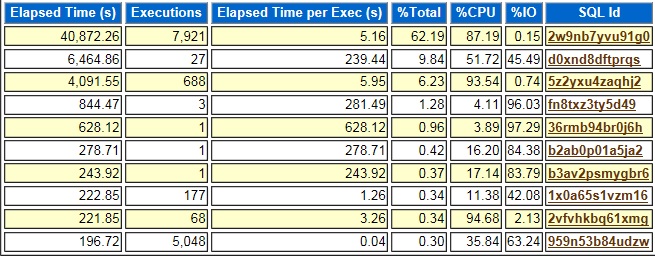
After extracting the bind variables, I used an AWR report to figure out which part of the plan contributed the most to the run time of the query so that I knew which bind variable value was causing the slowdown. Using an AWR report in this way only works if you do not have a bunch of slow SQL statements running at the same time. In this case the problem query 2w9nb7yvu91g0 was dominating the activity on the database with 62.19% of the total elapsed time. If there were a bunch of SQL Statements at the top of this list with similar percent of total values, it might be hard to use the AWR report to find information about this one query.

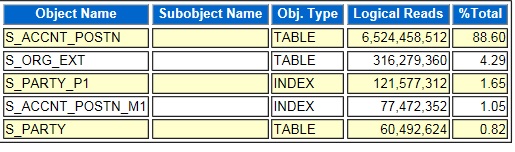
Since the activity for 2w9nb7yvu91g0 was 87.19% CPU I looked for the segments with the most logical reads. Logical reads are reads from memory, so they consume CPU and not disk I/O. In the graph below the segment for the S_ACCNT_POSTN table has 88.60% of the logical reads so most likely this segment caused the slowness of the query’s plan.

I looked at the plan for 2w9nb7yvu91g0 to see where the most heavily read table was used. This would probably be the source of the slow query performance. I found that it was doing a range scan of an index for the S_ACCNT_POSTN table that had the column POSITION_ID as its first column. This made me suspect that the plan was using the wrong index. If an index was used to retrieve many rows from the table that could take a long time. I did a count on all the rows in the table grouping by POSITION_ID and found that most rows had a specific value for that column. I replaced the actual POSITION_ID values with VALUE1, VALUE2, etc. below to hide the real values.

POSITION_ID            CNT
--------------- ----------
VALUE1             2075039
VALUE2               17671
VALUE3                8965
VALUE4                5830
VALUE5                5502
VALUE6                5070
VALUE7                4907
VALUE8                4903

Next, I verified that the query had an equal condition that related a bind variable to the POSITION_ID column of the problem table. This made me suspect that the plan in the shared pool was generated with a bind variable value for POSITION_ID other than VALUE1. So, that plan would work well for whatever value was used to create it. POSITION_ID would be equal to that value for a small percentage of the rows in the table. But, running the query in SQL*Plus with POSITION_ID=’VALUE1′ caused the optimizer to choose a plan that made sense given that this condition was true for most of the rows in the table. The PLAN_HASH_VALUE for the new plan was 1178583502.

I tested 1178583502 against a variety of possible bind variable values by using an outline hint in SQL*Plus scripts to force that plan no matter which values I tested against. I extracted the outline hint by running the query with POSITION_ID=’VALUE1′ and using this dbms_xplan call:

select * from table(dbms_xplan.display_cursor(null,null,'OUTLINE'));

Then I just added the outline hint to a copy of the same SQL*Plus script and tried various combinations of bind variable values as constants in the where clause just as I had tried VALUE1 for POSITION_ID. I used the values that I had extracted using bind2.sql. After verifying that the new plan worked with a variety of possible bind variable values, I used a SQL Profile to force 2w9nb7yvu91g0 to use 1178583502 and the problem was resolved.

I have just described how I created the original July SQL Profile by running a version of the problem query replacing the bind variables with constants that I knew would cause the original plan to run for a long time. The optimizer chose a better plan for this set of constants than the one locked into the shared pool for the original query. I used the PLAN_HASH_VALUE for this plan to create a SQL Profile for the July query. This is like an approach that I documented in two earlier blog posts. In 2014 I talked about using a hint to get a faster plan in memory so I could use it in a SQL Profile. In 2017 I suggested using an outline hint in the same way. In both of those cases I ran the problem query with hints and verified that it was faster with the hints. Then I used a SQL Profile to force the better PLAN_HASH_VALUE onto the problem query. So, in all these cases the key is to generate a better plan in any way possible so that it is in memory and then create a SQL Profile based on it. A lot of times we have queries that have run on a better plan in the past and we just apply a SQL Profile that forces the better plan that is already in the system. My December, 2018 post documents this type of situation. But the 2014 and 2017 blog posts that I mentioned above and the July 2018 example that I just described all are similar in that we had to come up with a new plan that the query had never used and then force it onto the SQL statement using a SQL Profile.

The incidents in January and July and the cases where I added hints all lead me to wonder how different one SQL statement can be from another and still share the same plan. The problem last week showed that two queries with slightly different select clauses could still use the same plan. The other cases show that you can add hints or run the statement with bind variables replaced with constants. In the January case I did not have to go back through the analysis that I did in July because I could quickly force the existing plan from the July query onto the January one. The January problem also shows the limits of SQL Profiles. The slightest change to a SQL statement causes a SQL Profile to be ignored, even though the plan would still work for the new SQL statement. But in the January case the ability to use the same plan for slightly different queries made it easy to create a new SQL Profile.

Bobby

Posted in Uncategorized | 2 Comments

Slides From January 2019 AZORA Meeting

Here are slides from the January 2019 AZORA Meeting with Charles Kim and Viscosity:

Oracle Database 12.2 New Features

Oracle Database 18c New Features

Thank you to Charles and Viscosity for making our meeting a big success, and thanks for sharing these slides.

Bobby

Posted in Uncategorized | Leave a comment

MIT’s Free Algorithms Track

MIT, the Massachusetts Institute of Technology, has published a free set of three undergraduate level Algorithms classes that I recommend to the readers of this blog. These are links to the three classes in the order that they should be taken.

Mathematics for Computer Science (Spring 2015)

Introduction to Algorithms (Fall 2011)

Design and Analysis of Algorithms (Spring 2015)

I took the 2010 version of the Mathematics for Computer Science class and I am almost done with the Introduction to Algorithms class. I am considering taking the third class next. I want to use this post to explain why I recommend this set of three classes.

All three of these classes have video lectures. These classes are part of a massive collection of free educational information that MIT publishes on its OCW or Open Courseware web site: ocw.mit.edu. I have focused on the Computer Science classes out of the many available. But only certain classes contain video. For example, the Database Systems class does not have video. It does have free lecture notes and other content that has real value, but the Algorithms track has three classes in a row with video and that makes them especially valuable.

In addition to the video content all three classes have valuable static content such as lecture notes. The Mathematics for Computer Science class has a free online textbook. It looks like the 2015 version has all kinds of interesting extra content that was not in the 2010 class that I took, and I thought the 2010 class was great. The last two classes have solutions to the problem sets, quizes, and exams which is great when you are studying this on your own.

The Introduction to Algorithms and Design and Analysis of Algorithms classes have a highly regarded standard Algorithms textbook for their readings. It is Introduction to Algorithms, 3rd Edition by by Thomas H. Cormen, Charles E. Leiserson, Ronald L. Rivest, Clifford Stein. This textbook is commonly referred to as CLRS and seems to be the standard textbook for people who are serious about Algorithms.

The price is right. All three of these classes are free. I did buy CLRS, or actually I got it as a present, so my wife’s parents bought it, but $65 is a worthwhile investment especially since it is the text for two of the three classes and a valuable reference afterwards. The first class is completely free since it has a free text book included. The three classes represent thousands of dollars’ worth of educational material for free.

These classes are not easy. I do not claim to have mastered this material. It is hard to really discipline yourself to study for a class by yourself without grades and deadlines and others to talk to about it. But I have learned a lot from the two classes that I have worked through. I am a little afraid to take on the third class which is the intermediate level Algorithms class. Yikes! But even if I struggle to fully grasp every assignment, I am learning something. Some of it is a reminder of things I learned long ago in college, but many things are new. So, I do not mind the classes being hard. Better hard than too easy.

So, if you want to learn about Algorithms this three-class sequence is a great way to go. But, why would readers of this blog want to study this subject? In my opinion, Algorithms is just one area of Computer Science that would be helpful for a database professional to learn. Obviously, it is great to learn about database theory if you work with databases. It is great to learn about other systems topics such as operating systems and compilers since your work uses this type of software. It is great to learn about hardware, software development, etc. I think that many aspects of my Computer Science background from long ago in school have helped me in my database job. So, I do not think that Algorithms is the most important or only thing within CS that a database person needs to know, but I do think that Algorithms is very helpful to database workers.

I think that all of the main topics within CS that a database person would want are covered on the list of OCW EE and CS classes. But it seems that Algorithms is unique in that it has a very nice three class sequence that is so fully developed with video and the other resources that I mentioned. Maybe there are other areas that I missed, but I know that Algorithms is well covered by OCW. So, that is why I am singling out this three-class sequence in this blog post. I believe that it is an especially well covered topic within Computer Science that is useful to database professionals and available for free. So, check it out!

Bobby

Posted in Uncategorized | 2 Comments

January 25th AZORA Meetup with Viscosity

If you are in the Phoenix, Arizona area on Friday, January 25th please come to the AZORA meetup with talks by Viscosity. Please RSVP on the meetup site so we know how much food to order: Meetup link. We have a great lineup of speakers with talks about new features of the latest Oracle database versions. I know that I have not kept up with all the latest features, especially with all the other technical training that is on my plate. So, I am looking forward to setting aside this dedicated time to learn about Oracle database features from highly qualified presenters.

Plus, it will be fun and includes lunch! Come join us for our first meeting of the new year.

Bobby

Posted in Uncategorized | Leave a comment