
DBAs spend a lot of time reviewing reports about the health of their databases. I’ve used an LLM to speed up that process.
I took a daily report about our Oracle databases and used an LLM to generate a short summary that lets a DBA immediately see which databases need attention.
A typical report looks like this for each database:
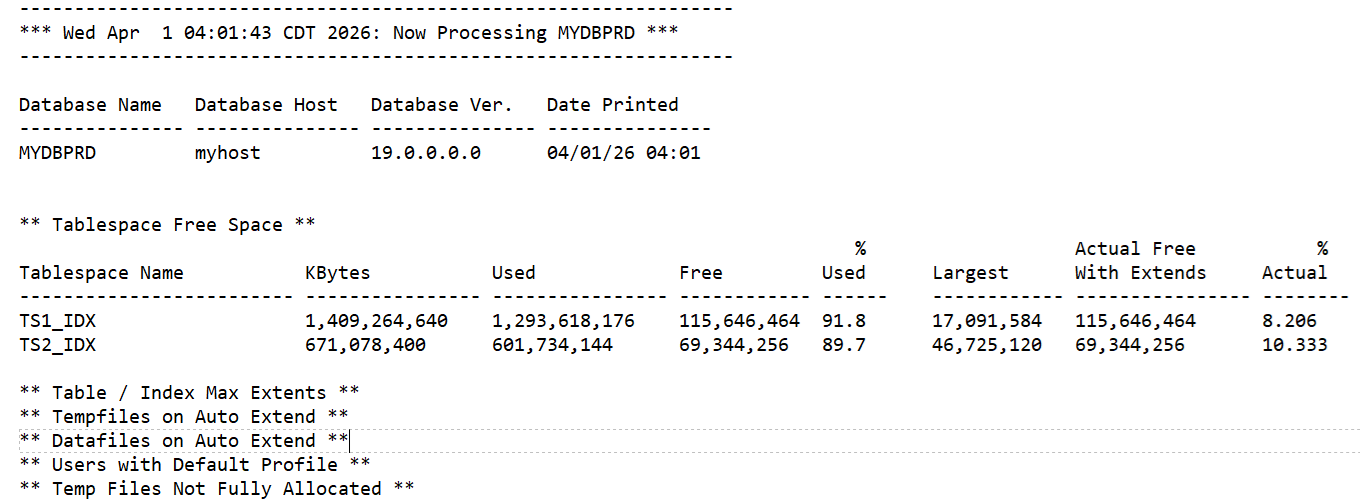
The full report has over 2,000 lines that must be manually scanned by the on-call DBA each day.
The LLM-generated summary looks like this:
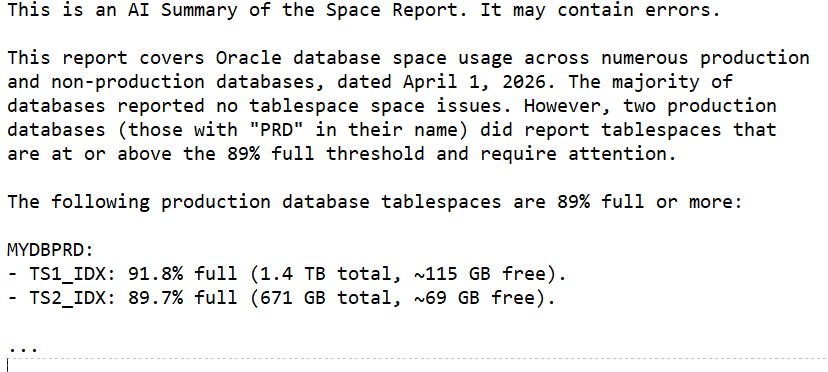
This summary immediately shows which databases need attention. We still manually scan the entire report but having the summary in the body of the email (with the full report attached) lets us see at a quick glance what needs attention and how urgent it is. The summary does not replace the full report; it only highlights the items that are most likely to be important. In our environment we chose 89% full as the point where we start reporting on space issues.
I’m using AWS Bedrock with the Claude Sonnet 4.6 model. Here is the Python
function that sends the combined prompt and report to Bedrock and returns the summary:
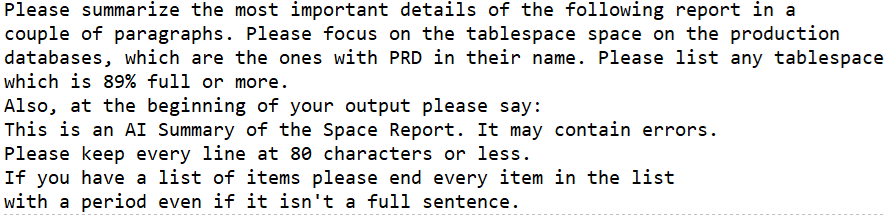
Here is the prompt that preceeds the report:
This simple use of an LLM has saved me time by putting a quick summary in the email body while preserving the full report for detailed review.
Bobby

